BxAgentsBxAgents
GitHub
AI agents without the plumbing

Build AI agents your team can ship.

Describe the agent with plain files and folders. bxAgents build hands you an ordinary web application: a web app with fourteen pages, an API with an OpenAPI document, twelve kinds of gateway, routines, a vault, backups and tests that need no API key. No glue code to write. Built for BoxLang and ColdBox developers, and for any team that wants agents as code it can read.

$ install-bx-module bx-agents
BuildConstrainOrchestrate
your-agent/ → .build/app/
your-agent/
The agent

Agent.yml is the agent

A name, a model and any settings you need, in plain YAML. Need code? Use a class-based Agent.bx instead.

a full MVC app, no scanning at boot
Trailer, just over 3 minutes

Your agent just got a workplace.

The whole web app, narrated: the left menu and every page, from chat and routines to the vault, logs and backups. Press the speaker to hear it; captions are on. The answers come from a scripted demo model, so they are canned.

exposes: "webui"Read the page-by-page guide

Running in minutes

Four commands take you from nothing to an agent you can chat with. A file in a folder is wired in; there is nothing to register.

No lock-in

Swap the model, the tools or the memory with one line, not a rewrite.

Does real work

Call your own code, use skills, hand off to sub-agents you can also talk to directly, and run routines on a schedule.

Safe to ship

Approvals before risky actions, admin and member roles, access tokens, a vault for the keys people hand to it, backups, and tests that need no API key.

  • Open source, Apache 2.0
  • 12 gateway types
  • A web app with 13 pages
  • 82 API routes, with OpenAPI
  • One CLI, 29 verbs
  • Tests that need no API key
  • A 29-lesson course
Everything the build gives you

Build it. Run it. Let it remember. Connect it. Operate it. Extend it.

Six jobs, each one a few files or a few lines of Agent.yml. Nothing here is a separate product to install.

Build

  • Folders are the API. Agent.yml and a prompt are enough. tools/, skills/, subagents/ and the rest are found at build time. Build pipeline
  • A wizard. bxAgents new asks what the agent should do and writes the project. Eight starters, a GitHub repo or ForgeBox. Wizard
  • Sub-agents you can talk to. A team is nested folders. Pick one in the web app's Talk to menu or with /agent. Sub-agents
  • Skills at three levels. Installed from the skills registry, shipped with the agent, or saved by the agent itself after a task, with your approval. The Registry page reads each one. Skills
  • Tests without tokens. mockResponses() runs specs with no key and no network. Testing

Run

  • A web app. Chat, conversations, routines, registry, connectors, memory, vault and more, in one generated page. Left menu, light and dark, phone ready. Web UI
  • A terminal chat. Full screen, 36 slash commands, @file and picture attachments, a context gauge, recording. Terminal UI
  • Routines. Say "every weekday at 9, check the build". The agent makes the routine, you approve it, a heartbeat runs it and saves reports. Routines
  • Schedules and approvals. Developer tasks on a timetable in schedules/; risky tools wait for approve or reject.
  • Ship it. Package a .bxa and deploy to local, SSH, FTP, SFTP, Docker or DigitalOcean. Deploy

Remember

  • Memory by default. Every agent and sub-agent keeps conversations per person in the chat database. The terminal, the web app and the API see the same ones. Compact or clear any time. Agent.yml
  • Notes. Short lines about each person, and shared notes about the agent's own work, read at the start of every conversation. Memory page
  • A data home. One folder holds the database, files, skills and backups. volumes: name the host folders the agent may read or write. Data and volumes
  • Backups and restore. bxAgents backup, or a button in the web app. A restore is applied at the next start and keeps what was there.

Connect

  • Gateways. Slack, Telegram, Discord, Teams, WhatsApp, Twilio SMS, GitHub, Signal and email, plus http, cli and mock. Routines can deliver to them. Gateways
  • An API. 88 routes, an OpenAPI document, a BoxLang client and access tokens. The web app and terminal use it too. The API guide
  • MCP. Host your tools as an MCP server, or use other servers; each person can sign in to a service with one click. Connect
  • Connectors. GitHub, Stripe, Notion, Atlassian, Cloudflare, Supabase and Git, each connected by the person who uses it. Connectors
  • A vault. Keys sealed in the database, typed in a hidden box, never shown to the model, with an activity log. Vault

Operate

  • Admins and members. Members see their own conversations and routines. Admins also get Agent, Gateways, Logs, Access and Data. Sign in
  • Tokens and people. Make and revoke access tokens, choose who is an admin; allowedIPs and a rate limit guard every route.
  • Logs. Five logs with secrets scrubbed, a page to follow them, and a red count when something failed. Logs
  • See how it is made. The agent tree, its files read only, tokens by day and model, and the state of every gateway, with a reconnect button.
  • Doctor. bxAgents doctor checks the runtime and the project. CLI

Extend

  • Extensions. One file or a folder adds slash commands, keys, status items, event listeners, schedulers and CLI verbs. Extensions
  • Page slots. Put your own panel in the web app's header, sidebar or composer, with your own CSS and JS.
  • Your own tools, skills and gateway types can ride in an extension. Install from a folder, a zip, GitHub or ForgeBox. First extension
  • Hooks and code. Interceptors, modules, named model profiles, and a class-based Agent.bx when YAML is not enough. Interceptors
The web app

One page for the people who use it and the people who run it.

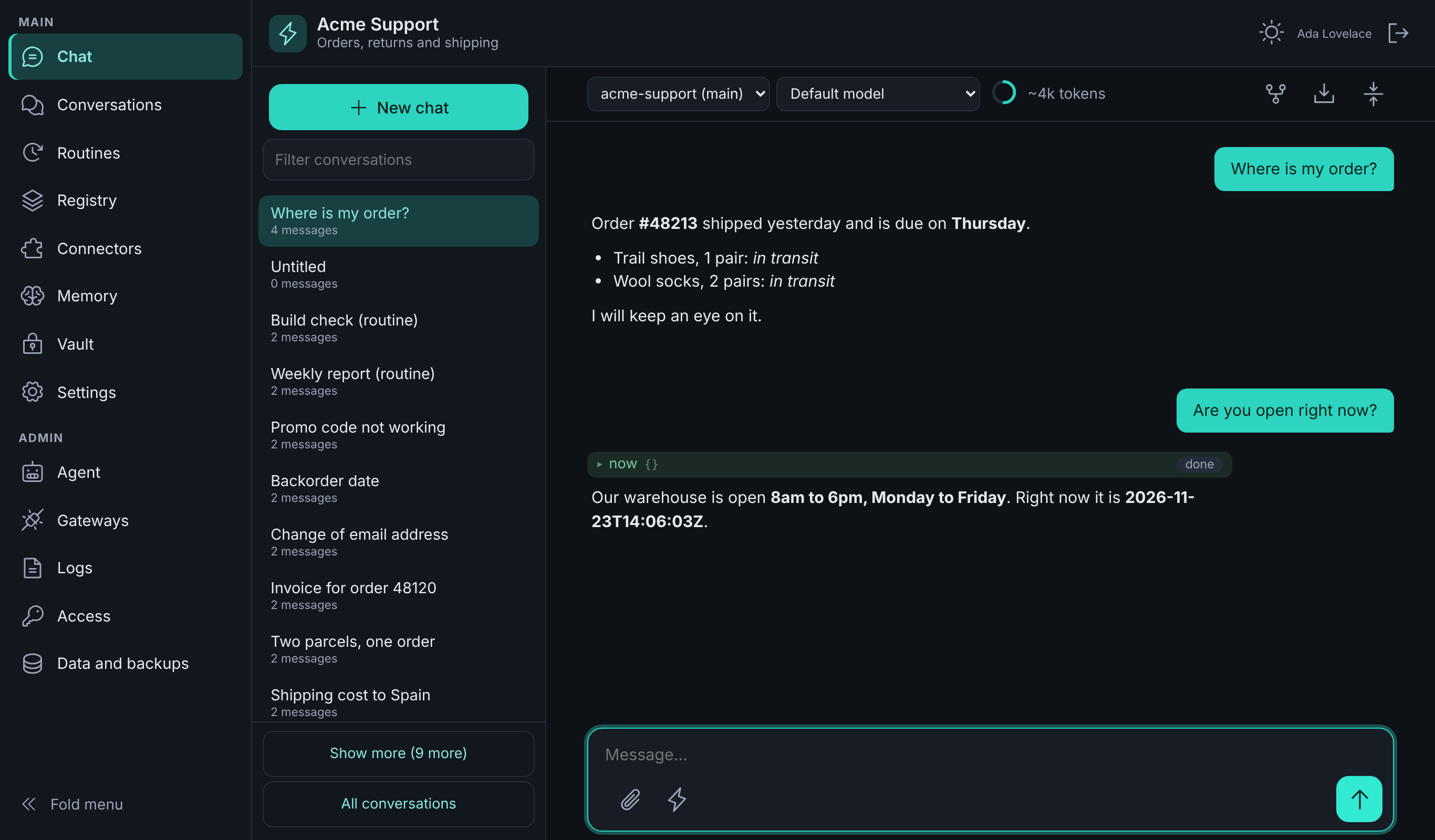
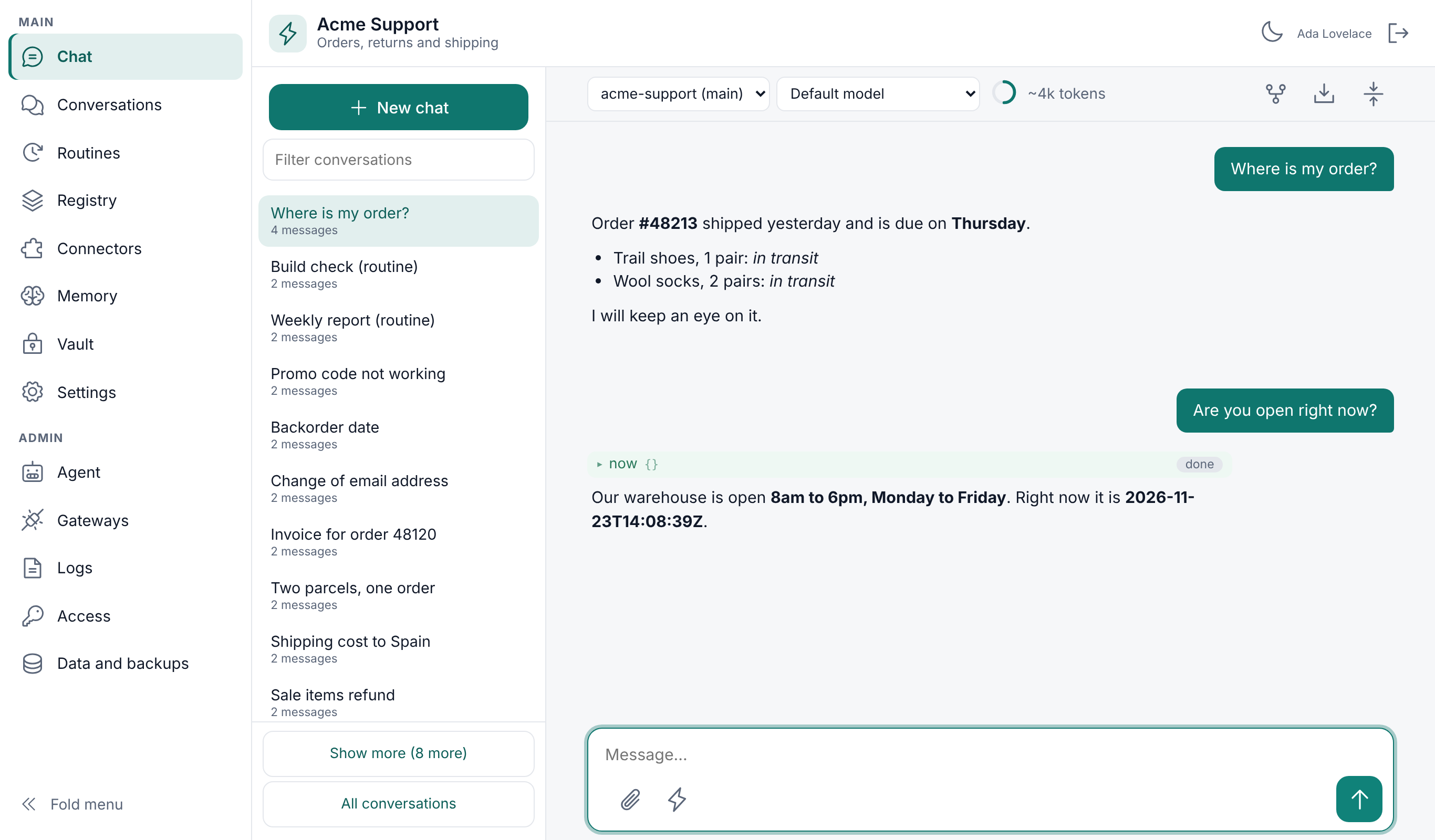
Set exposes: "webui" on a gateway and the build writes the whole app: a left menu with fourteen pages, streaming chat, light and dark, and a phone layout. Members see the first eight. Admins get the other five.

The web app in dark mode: the left menu, a conversation with a tool call and a formatted answer, with the model select in the chat barThe web app in light mode: the left menu, a conversation with a tool call and a formatted answer, with the model select in the chat bar

Main

Everyone
  • Chat Streaming replies, approvals, attachments, Talk to a sub-agent.
  • Conversations Search, filter by agent, source and date, fork, export.
  • Routines Make, run, pause and edit; read the reports.
  • Registry Tools, skills (with a reader) and volumes.
  • Connectors GitHub, Stripe, Notion and more, connected by each person.
  • Memory Your notes, the agent's notes, and what a conversation remembers.
  • Vault Your secrets and the agent's, by name, never by value.
  • Settings Appearance, model, account, server facts, extensions.

Admin

Admins only
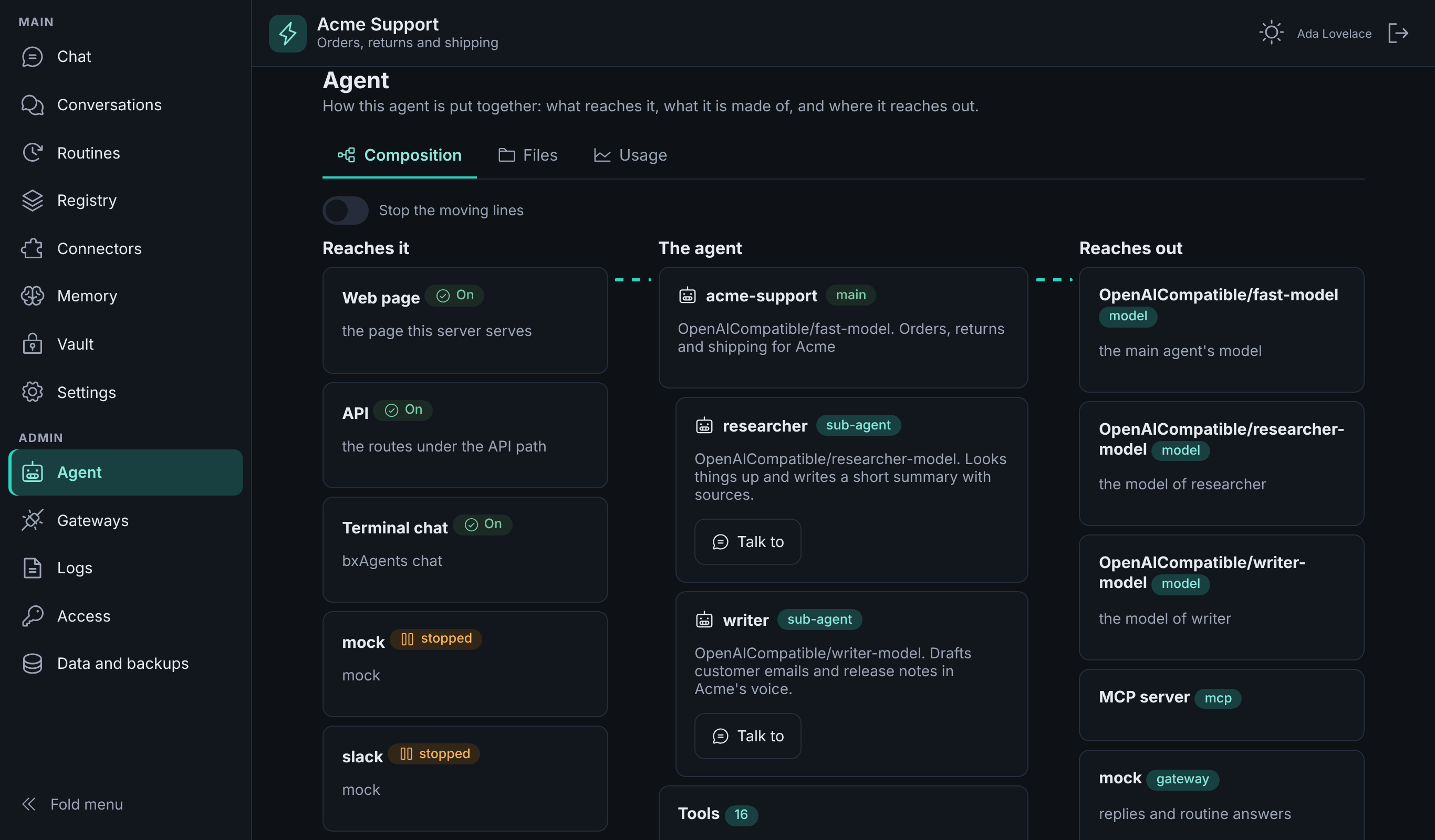
  • Agent Composition, files and token usage.
  • Gateways State, credentials set, last error, reconnect.
  • Logs Five logs, filter and follow.
  • Access Tokens and people, who is an admin.
  • Data and backups Where everything lives, back up, restore.

Read the page-by-page guide. The menu folds to icons, becomes a drawer on a phone, and every page works with the keyboard.

What you can build

Pick the problem. Write one file.

Each card is a job teams give their agents. Every one is a file in a folder, and the repo has a working example for most of them.

Answer people where they are

Put the agent in Slack, Telegram, Discord, Teams, WhatsApp, Twilio SMS, GitHub, Signal or email.

gateways/slack.bxA Slack bot over Socket Mode

Run a job every morning

Send the agent a message on a schedule, such as every weekday at 08:30. BoxLang starts the schedule with the app, so there is no cron daemon to run.

schedules/Digest.bxA task with .everyDayAt() that calls run()

Let people schedule their own work

A person asks, the agent makes a routine, the person approves it. A heartbeat runs it, saves reports, and sends a summary to a gateway chat if you choose one.

routines: enabled: true"Every weekday at 9, check the build"

Give each specialist a seat

Sub-agents are folders. The main agent hands work to them, and a person can also pick one in the web app or with /agent and talk to it directly. Each keeps its own memory.

subagents/researcher/A specialist in the Talk to menu

Let other systems call it

Expose the agent as a REST API, a web app or an MCP server that any MCP client can use.

gateways/expose.bxA REST API under a path you choose

Keep a human in the loop

A tool that needs approval stops the run and asks a person: in the terminal, the web app or a gateway.

a tool that needs approvalThe run waits for approve or reject

Connect it to your accounts

Keep API keys and logins in a vault. The agent sees names, never values, and each person can store their own.

vault: {}Keys sealed in the database, typed in a hidden box

Let each person sign in to a service

Mail, calendars and ticket systems ask each person to sign in. Add oauth to the server and each person connects once; the agent acts as them.

oauth: trueOne click to connect, tokens sealed in the database

Offer GitHub, Stripe, Notion and more

Seven ready-made connectors ship with every agent. Each person connects their own account; nothing is contacted until they do, and the agent acts as them.

connectors: { only: [ github ] }Leave the key out to offer all seven

Test without spending tokens

Every project ships a TestBox suite on a mock provider, so specs run in CI with no API key and no network.

tests/specs/AgentSpec.bxmockResponses() and agent matchers

Ship it anywhere

Package the agent to a .bxa and deploy it to a local folder, SSH, FTP, SFTP, Docker or DigitalOcean.

bxAgents packageA portable .bxa and deploy targets

Quick start

From nothing to a chat in four commands.

Install the module, scaffold an agent, build it, and talk to it. Nothing else to configure.

1Installinstall-bx-module bx-agents
2ScaffoldbxAgents new my-agent \ --model=openai/gpt-5
3Buildcd my-agent bxAgents build
4Talk to itbxAgents chat # or serve over HTTP bxAgents serve --port=8080
Then open http://127.0.0.1:8080. Bound to localhost only.
One API

The web app, the terminal and your code all use the same one.

Every built agent serves an HTTP API at /__bxagents: 88 routes for turns, conversations, routines, notes, the vault, logs, backups and more, 25 of them for admins only. Anything you can do in the web app or the terminal, a program can do too. Open on your own machine, locked down when you share it.

Open, or behind tokens

Open by default on localhost, with a loud warning if you bind it to every interface. Add a shared secret or named access tokens, and an admin can make and revoke tokens over the API.

agentApi: tokens: trueA caller needs an x-bxagents-token

Guarded by cbSecurity

Limit who can call by address and how often. The guards are cbSecurity route middleware, in front of every route, whether the API is open or not.

allowedIPs, rateLimit403 outside the list, 429 over the limit

Describes itself

The server hands out an OpenAPI 3 document of the routes it really has, with the request and answer shapes and the stream frames. Feed it to a client generator or Swagger UI.

GET /__bxagents/openapiOne document, made from the same list as the routes

Call it from BoxLang

A documented client with one method for every route: invoke, stream, run control, conversations, routines, notes, vault, commands and tokens.

new AgentApiClient( url, token )agentClient.invoke( "Hello" )

A full screen chat in your terminal

Keys you can rebind, 36 slash commands, saved sessions you can resume, fork and export, routines, notes, files and pictures with @, a context gauge, and recording.

bxAgents chatOr --connect to a server that is already running

Extend it with a file

Extensions add slash commands, keys, status items, page slots, CLI verbs, tools, skills and gateway types, and install from a folder, a zip, GitHub or ForgeBox.

extensions/audit.bxA new command in every place the agent chats
Take the tour

Real runs, recorded.

Every clip is a real session, not a mock-up. The web app trailer and the tours are narrated: press the speaker on the player to hear them, and captions are on where the page shows them. No model was called: the clips use the mock provider the examples ship with or a scripted demo model, so the answers are canned.

The whole web app in three and a half minutes

Four files, one running agent

You write the agent. The folders do the wiring.

This is the whole simple-agent example from the repo: a YAML file, a prompt, one tool. Add a folder when you need it, and the build picks it up.


Assembled at build time

Fast to start, easy to debug.

Most agent frameworks wire tools, skills, routes and schedules together every time they start. BxAgents does that once in bxAgents build and ships an ordinary app, so what runs is plain code you can read.

Discover

Walk the convention folders that exist and have content.

Validate

Reject bad config before anything runs.

Manifest

Record what was found in manifest.json.

Generate

Write config, handlers, router and scheduler.

Run

Start .build/app like any web app, or ship a .bxa.

Wired at request time

Convention scanning and file walking on every boot, and build work deferred into the request path.

Wired at build time

No scanning at startup. Starting the agent is starting an ordinary web application.

Reach it from anywhere

Twelve gateways. Hover one to inspect it.

Drop a file into gateways/ and your agent is on that channel. Each tile shows the type you set and the environment variables it reads, straight from the docs.

Hover, focus or tap a tile.

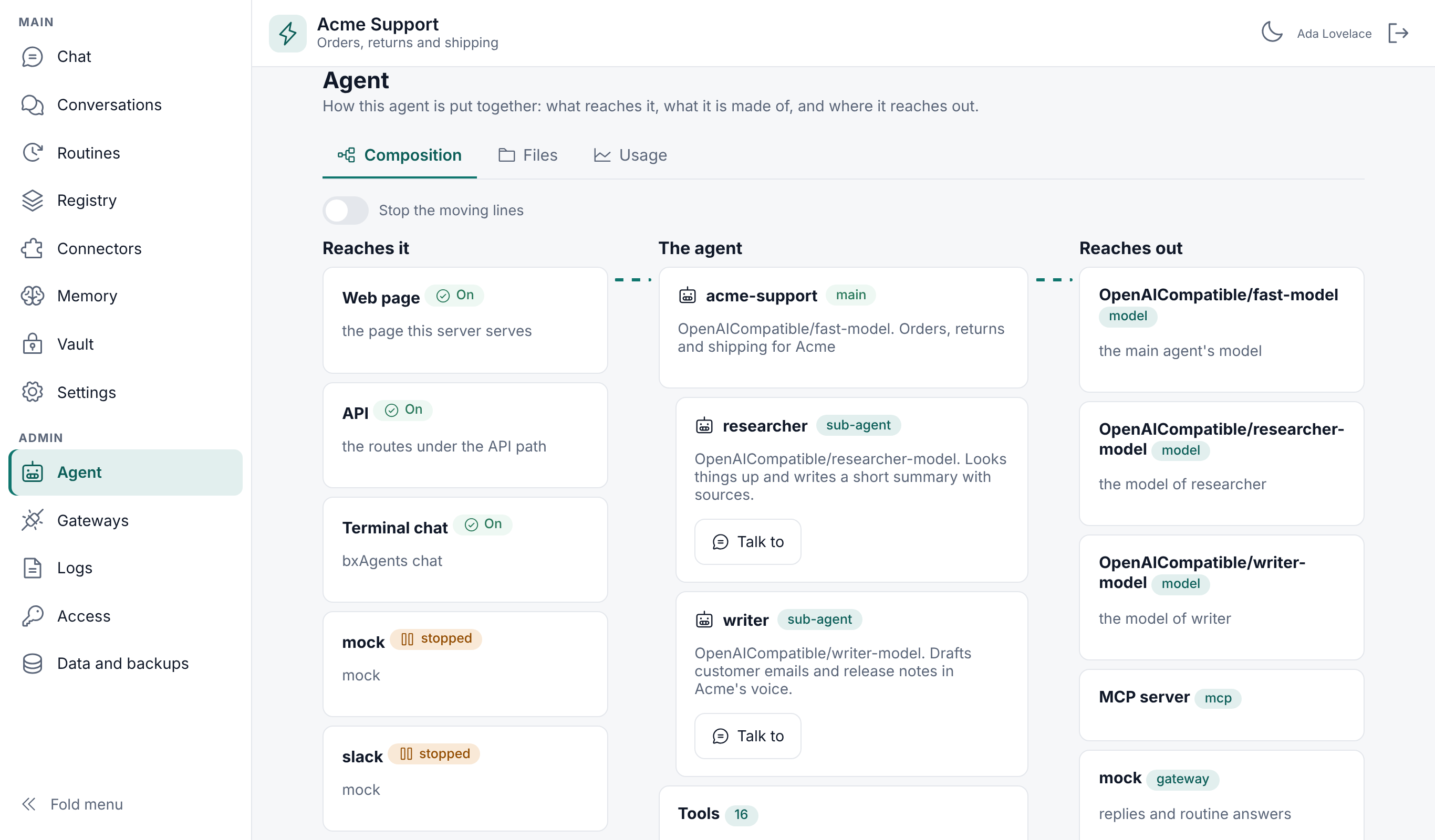
The Agent page in dark mode: what reaches the agent (the web page, the API, the terminal, two gateways), the agent and its sub-agents, and what it reaches out toThe Agent page in light mode: what reaches the agent (the web page, the API, the terminal, two gateways), the agent and its sub-agents, and what it reaches out to
  • The Agent page draws what reaches the agent, what it is made of and what it reaches out to.
  • Routines can send their answer to a gateway chat.
  • Light and dark, themeable from a gateways/ entry, with no front-end build step of your own.
A REST APIexposes: "agent"

Mounts invoke and info routes under a path you choose, like /api/chat.

A web appexposes: "webui"

The streaming chat and every page around it, at a path like /chat.

An MCP serverexposes: "mcp"

Any MCP client can connect at a path like /mcp.

See it serve

One gateway file, a working HTTP API.

One small file, gateways/expose.bx, and the build mounts a REST API for your agent. The output on the left is a real capture from a served agent.

curl, against the served agent
Loading the captured session...
gateways/expose.bx
class {

	function configure() {
		return {
			exposes : "agent",
			path    : "/api/chat"
		};
	}

}

Captured on 2026-10-16 from the http-gateway-agent example on BoxLang 1.16.0. It uses the mock model provider, which answers every input with "Mock response", so no model was called. The routes on the right are read from the /info response.

Start from something, not nothing

Pick a starter. See exactly what you get.

Generated by the real scaffolder for each template. Select a file to read it.

$ bxAgents new my-agent --model=openai/gpt-5 --template=minimal
Agent.bx
newadded by the starterchangeddiffers from minimalDimmed folders are empty conventions, ready for you.Also: --repo=owner/repo and --forgebox=<slug>.
Learn it properly

A 29-lesson course, from install to a deployed agent.

Follow the guided path through the same conventions you just saw. No account needed: the course remembers where you stopped in your own browser.

By the last lesson you will have builtA support agent with its own tool, a skill and subagents, a web app, routines and reports, people with roles and tokens, a vault for its secrets, tests that run without an API key and a backup, packaged as a .bxa ready to deploy.
0 of 29 lessons read
Consulting and support

Need agents in production? Talk to the people who build BoxLang.

Ortus Solutions offers professional support, architecture reviews and custom development for BoxLang, including agent design, gateways, tools and deployment.

Priority supportAnswers from the team that wrote the runtime.
Custom developmentAgents, tools, gateways and integrations built to your brief.
Training and reviewGet your team productive and your design checked.

Describe the agent.
Let the folders do the rest.