CLI Reference
Every bxAgents verb and its flags.
On this page
CLI Reference
Usage: boxlang module:bxAgents <verb> [options]
(or the shorter bxAgents <verb> [options] form - see Installation.)
Global flags
These are handled before verb dispatch and never reach a verb.
| Flag | Effect |
|---|---|
-h, --help, help | Print usage (every verb + description) and exit 0. Accepted in any position, so bxAgents clean --help prints usage rather than running clean. Also printed (exit 1) if no verb is given at all. |
-v, --version | Print bxAgents v{version} and exit 0. Only meaningful as the very first token, so it never collides with package --version=1.0.0. |
The banner
At an interactive terminal, bxAgents --help and the end of the new wizard greet you with the BxAgents name in block letters, painted in a gradient picked at random from eight themes (Ocean, Fire, Sunset, Purple, Mint, Gray, Forest, Gold), the same idea as the ColdBox CLI's banner. It is never written to a pipe or a file.
| Setting | Effect |
|---|---|
NO_COLOR, --no-color | Same shape, no color |
TERM=dumb, output that is not UTF-8, or a terminal narrower than the art (76 columns) | One plain line instead |
--no-banner, or BXAGENTS_BANNER=off | No banner |
BXAGENTS_BANNER_THEME=Ocean | Pin a theme instead of a random one, for a recording that comes out the same every time |
Every verb accepts
--projectRoot=<path> (or a bare positional path as the first non-flag argument) to target a project other than the current directory. Precedence: --projectRoot flag > first positional argument > current working directory.
Argument syntax
Follows BoxLang's own documented CLI conventions:
| Form | Result |
|---|---|
--option | true |
--option=value / --option="quoted value" | value (surrounding quotes stripped) |
-o=value | short form with a value |
-o | short form, true |
-abc | combined shorthand: a, b, c all true |
--!option / --no-option | negation, false |
| anything else | a positional (the first becomes the project-root fallback) |
Repeated options: last one wins.
Note the first row: a bare --option is a boolean, not a way to pass the next token as its value. A flag that requires a value (--model, --message, --password, --environment, --port, ...) is therefore rejected with an error when written bare, rather than silently becoming true:
$ bxAgents new my-agent --model openai/gpt-5
Error: --model requires a value - write it as `--model=<value>`.
Always use the --flag=value form. The space-separated form is not supported.
Tab completion
completions/ holds ready-made completion scripts for bash, fish and PowerShell. See Installation for the one-line setup of each.
Verbs
Scaffold a new agent project.
Add a tool, interceptor, schedule, MCP server, gateway, subagent or skill to an existing project.
Find, install, update and remove skills from skills.boxlang.io.
Run the full build pipeline.
Run your project's own tests/specs via TestBox.
Launch a real boxlang-miniserver process.
Interactive REPL against the built agent.
One non-interactive turn - for scripting/CI.
Package a built project into a .bxa.
Ship to a real deployment target.
Hash a plaintext password for a webui users entry.
Issue, list and revoke access tokens for a deployed agent.
Read and manage the notes an agent keeps.
List the models a project can talk to and test that they answer.
List, rename, fork, delete, export and import the conversations in the chat database.
What the model calls used: tokens by model, provider, day or user, once the project turns usage on.
Report how the agent is composed, from its source.
List the extensions the chat loads, where each came from and what it added.
Remove a project's .build/ and dist/ output.
Diagnose the runtime and project before build/serve surprise you.
new
Create a new agent project one of three mutually exclusive ways: scaffold it (answering questions at a terminal, or with flags), clone a GitHub repo, or install a ForgeBox package.
# At a terminal: answer questions (see the new wizard guide)
bxAgents new my-agent

# Scaffold from flags (default template: minimal)
bxAgents new my-agent --model=openai/gpt-5 [--template=minimal|webui-chat|slack-bot|telegram-bot|github-bot|mcp-server|scheduled|multi-agent] [--name=...] [--description=...] [--class] [--skipInstall]

# The same, adding what the wizard would have offered
bxAgents new my-agent --model=claude --with=time,search --search=brave --mcp=github --channels=web,telegram --guard=flag

# Clone an existing GitHub repo
bxAgents new my-agent --repo=owner/repo-name

# Install a ForgeBox package
bxAgents new my-agent --forgebox=some-package-slug
- With no
--model, no--repoand no--forgebox, at a terminal,newruns the wizard.--no-wizardor--yesturns it off,--wizardturns it on even with a--model, and--no-tuiasks the same questions as numbered lines. A--modelon its own never starts it, since scripts have always had to pass one. The wizard's flags (--with,--search,--files,--files-dir,--temperature,--max-tokens,--timeout,--memory,--mcp,--channels,--web-auth,--guard,--prompt,--widgets,--widgets-bottom,--deployand the deploy details) are listed in the wizard guide; a bad value names the flag and what it accepts. They needAgent.yaml, so they cannot be combined with--class. --template,--repo, and--forgeboxname three different project SOURCES - exactly one applies. Combining any two of them is an error.--templatemode (the default when no source flag is passed at all -minimal):--modelis required when no questions are asked - aprovider/modelslug (see the model slug).--namedefaults to the target directory's own basename.- Refuses to run if the target already contains an
Agent.yamlor anAgent.bx. - Creates
Agent.yaml,instructions.md, every convention folder (empty), a rootbox.json(testboxas a development dependency, installed intolib/testbox), a ready-to-runtests/folder (tests/specs/AgentSpec.bx), a.envdeclaringBOXLANG_HOME=.build/runtime(matchingserve's own scoped runtime home), a.gitignore(.env,.build/,dist/,lib/,boxlang_modules/, editor files), and the standard dotfiles.editorconfig,.gitattributes,.bxlint.json,.markdownlint.jsonand a.boxlang.jsonlisting every bx-ai setting at its default (the BoxLang runtime reads it when run from the project root; edit the values there). Never overwrites a file that already exists. BoxLang andboxlang-miniserverload a.envfrom the project root themselves, so the file also works for your API keys; BxAgents never reads, copies or packages it. --class(a bare boolean flag, like the others described above) writes the class-basedAgent.bxinstead of the defaultAgent.yaml, for agents whose definition needs code (hooks, dynamic instructions). It applies to the root and to any subagents a template scaffolds, and only to--templatemode - not to--repo/--forgebox.--templatepicks one of 8 built-in starters, each layering a bit of pre-wired content on top of the base skeleton above (see Agent Templates for every generated file in full, plus how--repo/--forgeboxsources work and how to publish your own):minimal- the bare skeleton, nothing extra.webui-chat- adds agateways/webui.bxexposing the web chat UI at/chat.slack-bot- adds agateways/slack.bxchannel adapter, plus matchingSLACK_BOT_TOKEN/SLACK_APP_TOKENstub lines in.env.telegram-bot- adds agateways/telegram.bxchannel adapter, plus a matchingTELEGRAM_BOT_TOKENstub line in.env.github-bot- adds agateways/github.bxchannel adapter, plus matchingGITHUB_TOKEN/GITHUB_WEBHOOK_SECRET/GITHUB_BOT_NAMEstub lines in.env.mcp-server- adds an examplemcp/exampleServer.bxtool server and agateways/mcpExpose.bxentry exposing it as an MCP server at/mcp.scheduled- adds a realschedules/Scheduler.bxcalling the agent on a daily timer.multi-agent- adds asubAgentslist to the rootAgent.yamldeclaring two subagents (researcher,writer), each scaffolded as its own realsubagents/<name>/Agent.yaml+instructions.md.
- Also runs
box installin the new project root, sobxAgents testworks immediately with no separate install step. This is best-effort: ifboxisn't onPATHor the install fails,newstill succeeds - the message just tells you to run it yourself. Pass--skipInstallto opt out of this step entirely.
--repomode (--repo=owner/repo-nameor a full URL): clones the repo via a bundled JGit dependency - nogitbinary needs to be installed. Always clones shallow (depth 1) and always strips the resulting.gitfolder afterward, so the new project starts with a clean history rather than staying tied to the template repo's own remote. Refuses to run into a directory that already exists and is non-empty, and fails clearly if noAgent.yamlorAgent.bxis found in the cloned repo.--forgeboxmode (--forgebox=<slug>): installs a ForgeBox package by talking to ForgeBox's own REST API directly (noboxCLI required). Fails clearly if the slug doesn't exist, the download fails, or the installed package has noAgent.yamlorAgent.bxat its root (unwrapping one level of nesting first, since many ForgeBox archives wrap their contents in a single top-level folder).- Only
--templatemode needs--model;--repo/--forgeboxnever require it, since the source project already defines its own. --name/--descriptionare ignored (with a warning in the output) when--repo/--forgeboxis used - the cloned/installed project defines its own.- The
box installconvenience step (and--skipInstall) only ever apply to--templatemode - a cloned/installed project's ownbox.json(if it has one at all) is left untouched.
add
Add one thing to a project that already exists, asking the same questions new asks. Today that is a tool, an interceptor, a schedule, an mcp server, a gateway, a subagent, a skill, a profile, a provider or a capability.
bxAgents add                        # pick what to add
bxAgents add tool                   # asks for the name, function, description and arguments
bxAgents add tool WeatherTools --function=getWeather --description="Get the weather for a city" --args="city, days:numeric"
bxAgents add tool Pinger --agent=researcher     # into subagents/researcher/tools/
bxAgents add tool Pinger --dry-run              # show the file, write nothing
- The positional arguments are the kind and the name, so the project is found by
--projectRoot=<path>or the current folder only. - At a terminal, whatever is not given as a flag is asked, in the full-screen UI (or numbered lines with
--no-tui). With--yes, in a pipe or in CI nothing is asked: flags and defaults are used, and a required answer that is missing names the flag to pass. - Questions end on a review of the files that will be written. Cancelling, with Esc or Ctrl+C, changes nothing.
- Nothing is overwritten. If a file already exists none are written and the error names it;
--forcereplaces it. --dry-runprints each file with its text and writes nothing.
add tool
Creates tools/<Name>.bx with one @AITool function in the shape bx-ai documents: a docblock describing each argument, the annotation carrying the description the model reads, and typed required arguments from which bx-ai builds the tool's schema.
| Flag | Meaning |
|---|---|
--name=<Name> | The file name, or the second positional. Letters, digits and underscores, starting with a letter. |
--agent=<subagent> | Whose tool it is. Asked only when the project has subagents; . (the default) is the root agent. |
--function=<name> | The function the model calls. Defaults to the file name with a lower-case first letter. |
--description=<text> | What the tool does. The model reads it to decide when to call the tool. Without it, and with nothing to ask, the file gets a TODO description and the output reminds you to replace it. |
--args=<list> | Comma separated, each name or name:type (string by default; numeric, boolean, array, struct, date and any also work). |
A tool belongs to the agent whose folder it is in and is attached to that agent automatically. Two tool files of one agent may not share a name, even in different subfolders, so a clash is refused here instead of at the next build. Check the result with bxAgents inspect --section=tools.
add interceptor
Creates interceptors/<Name>.bx with one method for each interception point you pick, and the @scope that the build splits on.
bxAgents add interceptor AuditLogger --points=preProcess,onException --description="Log every request"
bxAgents add interceptor AiWatch --scope=runtime --points=beforeAIModelInvoke,onAIError
| Flag | Meaning |
|---|---|
--name=<Name> | The file name, or the second positional. A name another interceptor already uses is refused. |
--scope=agent\|runtime | agent (the default) is a ColdBox interceptor registered with the generated app when it starts; its methods take ( event, interceptData, rc, prc ). runtime listens to the events bx-ai announces in the BoxLang runtime and takes the event data as its one argument; BxAgents copies it to .build/runtime-interceptors but does not register it for you. |
--points=<list> | Comma separated interception points. The picker offers the common ones; any ColdBox core point (agent) or bx-ai event (runtime) can be named here, and a name that is not a point for that scope is refused. Defaults to preProcess (agent) or beforeAIModelInvoke (runtime). |
--description=<text> | One line for the class's docblock. Optional. |
add schedule
Adds a task to schedules/Scheduler.bx that sends the agent a message on a schedule. Only two things are asked: when it runs and what it says to the agent. Overlapping runs are always prevented (.withNoOverlaps()).
bxAgents add schedule --when="weekdays 08:30" --prompt="Summarize yesterday's findings"
bxAgents add schedule digest --when="every 15 minutes" --prompt="Check for new tickets" --agent=researcher
bxAgents add schedule                          # asks how often, the details, a name, and what to say
| Flag | Meaning |
|---|---|
--when=<phrase> | When it runs, in one of the phrases below. At a terminal, leave it out and you are asked how often, then the details. |
--prompt=<text> | The message sent to the agent each time. |
--name=<name> | The task's name, or the second positional. Defaults to a name made from the phrase. A name already in the scheduler is refused. |
--agent=<subagent> | Which agent runs it. Asked only when the project has subagents; . (the default) is the root agent. The task looks the agent up by its declared name, so renaming the agent means editing the task. |
| Phrase | Runs |
|---|---|
every 15 minutes, every 2 hours, every 1 days | At that interval |
hourly, hourly :15 | Every hour, on the hour or at that minute |
daily 09:00 | Every day at that time |
weekdays 08:30, weekends 10:00 | Monday to Friday, or Saturday and Sunday |
weekly mon 09:00 | Once a week (mon tue wed thu fri sat sun) |
monthly 1 09:00 | Once a month on that day, 1 to 28 so that no month skips it |
first-business-day 09:00, last-business-day 17:00 | On that business day of each month |
Times are 24 hour HH:mm in the scheduler's timezone. There is no cron phrase: ColdBox's ScheduledTask has no cron method, so for anything else write the task by hand with its full DSL.
- If
schedules/Scheduler.bxdoes not exist it is created. If it does, the task is added at the end ofconfigure()and the rest of the file is left as it was. - If
configure()cannot be found, nothing is changed and the error carries the task to paste in. - Scheduled tasks run while the app is served (
bxAgents serve). Check the result withbxAgents inspect --section=schedule.
add mcp
Adds an MCP server in either direction: one the agent calls (written into Agent.yaml), or one the project hosts (mcp/<name>.bx).
bxAgents add mcp client github                 # a server from the catalog the new wizard uses
bxAgents add mcp client --url=https://mcp.acme.dev/mcp --name=acme --auth=bearer --env=ACME_TOKEN
bxAgents add mcp server tools --description="My tools"
bxAgents add mcp                                # asks which way
add mcp client adds an entry to the agent's mcpServers: list. A name from the catalog (github, stripe, notion, atlassian, cloudflare, supabase, git) fills in the address and the sign-in, or for a server that runs as a program on this machine (git) the command to start it and what it needs on the PATH; otherwise give --url.
| Flag | Meaning |
|---|---|
--url=<address> | A server not in the catalog. An address with a user name, password or key in it is refused: the secret belongs in an environment variable. |
--name=<label> | A label for Agent.yaml; it is not sent to the server. |
--auth=none\|bearer\|header\|basic | How it signs you in. bearer writes token, header writes headers (name it with --header=), basic writes user (with --user=) and password. |
--env=<NAME> | The environment variable that holds the key or password. Only the name goes in Agent.yaml, as ${env.NAME}; an empty NAME= is added to .env for you to fill in. |
--timeout=<ms> | Optional. |
--agent=<subagent> | Which agent uses it; . (the default) is the root agent. |
add mcp server writes mcp/<name>.bx offering the project's tools through bx-ai's MCP server, and, unless you decline, a gateways/<name>Mcp.bx entry that serves it over HTTP.
| Flag | Meaning |
|---|---|
--name=<name> | The file name and the server's name. Defaults to tools. |
--description=<text>, --version=<x.y.z> | What other agents see. |
--tools=<list> | Which tools to offer. Defaults to all of the root agent's tools; a name that is not one of them is refused. |
--cors=<origin> | Web origins allowed to call it from a browser; * for any. Empty for none. |
--expose / --no-expose, --path=<path> | Whether to serve it over HTTP, and where (default /mcp/<name>). A path another gateways/ entry uses is refused. |
The tool list is written out when you run the command, so a tool added later has to be added to mcp/<name>.bx. The served route has no authentication of its own: keep it off public networks or put it behind a proxy that checks a credential.
Agent.yamlis edited by inserting lines only, so its comments and layout stay as they are. If the list cannot be extended that way (written on one line, say), or the definition is a class-basedAgent.bx, nothing is changed and the error carries the entry to paste.- A server the agent already uses, by name or address, is refused.
add gateway
Adds one way in to the agent: a chat platform, the web chat UI, or the HTTP API. (A hosted MCP route is added with add mcp server.)
bxAgents add gateway telegram                   # polls Telegram, no public address needed
bxAgents add gateway slack --env=botTokenEnvVar=ACME_BOT,appTokenEnvVar=ACME_APP --policy=steer
bxAgents add gateway web --auth=key             # the browser chat page, behind a random shared key
bxAgents add gateway api --path=/api/chat
bxAgents add gateway                            # asks which
The platforms are the ones the new wizard offers: telegram, slack, discord, whatsapp-cloud, teams, twilio, github, email and signal.
| Flag | Meaning |
|---|---|
--name=<name> | The file, gateways/<name>.bx, or the second positional. Defaults to the type. A name in use is refused. |
--env=<config=NAME,...> | Chat platforms: which variable holds which credential, for example botTokenEnvVar=ACME_BOT. Without it the usual names are used (SLACK_BOT_TOKEN, ...). Only names go in the gateway file; an empty stub for each goes in .env. |
--policy=queue\|reject\|steer\|interrupt | Chat platforms: what to do with a message that arrives while the agent is still answering. Written to Agent.yaml's gatewaySession unless it is the default queue. |
--path=<path> | web and api: where it is served (/chat and /api/chat by default). A path another gateway uses is refused. |
--auth=open\|key\|users | web: anyone who can reach it, a random shared key kept in .env as CHAT_UI_API_KEY, or named users. |
--profiles=a,b | web: the project's profiles people can pick in the chat (see Choosing the model). Asked only when the project has profiles; none keeps the page on the agent's own model. |
--users=<name:hash,...> | web with users: each hash comes from bxAgents hash-password. A password is never taken as a flag; at a terminal you type it, hidden, and only its hash is stored. |
After a chat platform is added, the output lists the steps that happen outside the project (creating the bot, a public address, a daemon) and which .env variables to fill in; bxAgents doctor reports any that are still not set. The HTTP API route has no authentication unless agentApi.tokenEnvVar is set in Agent.yaml.
add subagent
Adds a subagent: a whole agent under subagents/<name>/ with its own model, tools, MCP servers, memory and guard, wired into a parent's subAgents list. At a terminal it asks the same questions as new (purpose, model, tools, search, files, memory, MCP, guard); the questions only a whole project needs (shape, channels, deploy) are left out.
bxAgents add subagent researcher                # asks
bxAgents add subagent writer --model=openai/gpt-5 --description="Writes the answer"
bxAgents add subagent checker --model=claude --parent=writer --with=search --search=brave --guard=flag
| Flag | Meaning |
|---|---|
--name=<name> | The folder, or the first positional. A name any agent in the project already has is refused. |
--parent=<folder> | The agent that delegates to it: . for the root (the default) or the folder of another subagent, which is how they nest. |
--model=<provider/model> | Required without a terminal, unless --profile is given. |
--profile=<name> | Use one of the project's profiles instead of a model, as the main agent can with profile:. At a terminal, a project that has profiles is asked which to use. |
--description, --with, --search, --files, --files-dir, --memory, --mcp, --guard | The same as new. |
Writes subagents/<name>/Agent.yaml (with the environments.test mock model, so bxAgents test needs no key) and instructions.md, and adds an empty .env stub for each key the choices need. The name is inserted into the parent's subAgents without rewriting the file, so comments and order stay as they were. If the parent is a class, or its list is written in a shape that cannot be extended by inserting, nothing in it is changed and the line to add is printed. Packages a choice needs (bx-playwright for browsing) are named for you to add to box.json.
add skill
Adds a custom skill of your own: skills/<name>/SKILL.md, in the Claude Agent Skills shape. It goes into source control with the project and into every build.
bxAgents add skill release-notes --description="Use this skill when writing release notes"
bxAgents add skill                              # asks
| Flag | Meaning |
|---|---|
--name=<name> | The folder, or the first positional. Lowercase letters, digits and hyphens. A skill that already exists is refused. |
--description=<text> | One sentence starting "Use this skill when". The model reads it to decide whether to load the skill, so it is the part that matters. Without it a TODO is written for you to replace. |
Skills are not wired to an agent: every skill in the build is available to the model. Skills from skills.boxlang.io are not added here; they are installed, not written.
add provider
Adds the settings every call to one provider starts from, under providers: in the root Agent.yaml (bx-ai's providers setting): the temperature, longest answer and timeout, whichever model or profile is used.
bxAgents add provider openai --temperature=0.2 --timeout=60
bxAgents add provider                           # asks
| Flag | Meaning |
|---|---|
--provider=<id>, or the first positional | A provider bx-ai knows. One that already has settings is refused. |
--temperature, --max-tokens, --timeout | At least one is needed. Written as params (temperature, max_tokens) and options (timeout). |
The provider's key is never asked for: its usual variable (OPENAI_API_KEY) gets an empty stub in .env. The entry is inserted without rewriting the file, so comments and order stay. Needs an Agent.yaml at the root.
add profile
Adds a named combination of provider, model, settings and key variable under profiles: in the root Agent.yaml (bx-ai's profiles setting). An agent picks it with profile: <name>, and defaultProfile names the one the app starts on.
bxAgents add profile fast --provider=openai --model=gpt-5-mini --temperature=0.2 --default
bxAgents add profile planner --provider=claude --model=claude-opus-4 --description="Thinks first"
bxAgents add profile                            # asks
| Flag | Meaning |
|---|---|
--name=<name>, or the first positional | Letters, digits, - and _, starting with a letter. default, a provider's name and a name already used are refused. |
--description=<text> | What it is for. |
--provider=<id>, --model=<model> | The provider, and a model of it. Without a model the provider's own default is used. |
--api-key-env=<NAME> | Another environment variable for its key, when two profiles of one provider need different keys. Only the name is written. |
--temperature, --max-tokens, --timeout | As for add provider. |
--default | Also sets defaultProfile. An existing defaultProfile is never changed: the line to edit is printed instead. |
Adds an empty .env stub for the key variable. Check the result with bxAgents inspect --section=ai.
add capability
Sets the default provider and model for one thing besides chat, in the root Agent.yaml with bx-ai's own names. One command for all four; it asks only the questions that capability has.
bxAgents add capability embeddings --provider=openai --model=text-embedding-3-small
bxAgents add capability speech --provider=openai --voice=alloy --format=mp3
bxAgents add capability                         # asks which one
| Capability | Keys it writes |
|---|---|
embeddings | provider, model |
speech | provider, model, voice, format |
transcription | provider, model |
image | provider, model, size, quality, style, instructions |
Every key but the provider is optional; left out, the provider's own default applies. bx-ai keeps speech and transcription on one audio provider, so the second of the two defaults to the first's provider and a different one is refused. A capability that is already set is refused: edit it in the file. The provider's key variable gets an empty stub in .env; the key itself is never asked for.
skills
Skills from the registry (skills.boxlang.io), the way coldbox ai skills installs them. A skill of your own goes in skills/ instead: see add skill.
bxAgents skills find release                    # search the registry
bxAgents skills install ortus-boxlang/skills/boxlang-developer~configuration
bxAgents skills install                         # restore what the lock lists and the disk lacks
bxAgents skills list                            # what is installed, and whether it is intact
bxAgents skills update [name...] [--dry-run]    # fetch newer versions
bxAgents skills remove <name>
| Command | What it does |
|---|---|
find <words> | Searches names and descriptions. Shows the reference to install, the registry's audit result and the install count. Needs no project. --limit=<n> (default 10), --json. |
install <owner/repo/skill>... | Installs into .agents/skills/<name>/SKILL.md and records it in .agents/skills.lock.json. The last part can be the slug (boxlang-developer~configuration), the path in the repository (boxlang-developer/configuration) or the skill's name. A skill that failed the registry's security audit is refused; one that is not trusted is flagged. |
install | With no reference, restores what the lock lists and the disk lacks. |
list | One line per installed skill. Notes one that is missing, or edited since it was installed. --json. |
update [name...] | Fetches newer versions. A skill you edited is skipped, with what to do; --dry-run only reports. |
remove <name> | Deletes the skill and its lock entry. |
--registry=<url> (or the BXAGENTS_SKILLS_URL environment variable) points at another registry.
Where things live
| Path | What | In source control |
|---|---|---|
skills/<name>/ | Skills you wrote | Yes |
.agents/skills/<name>/ | Skills installed from the registry | No. install adds the folder to .gitignore. |
.agents/skills.lock.json | What is installed, its source and its sha | Yes |
build restores any skill the lock lists and the disk lacks, so a fresh checkout builds the same agent, and fails naming the skill if the registry cannot be reached. Nothing is fetched when they are all there, so an offline build of a restored project works. Both folders go into the build; a skill of your own with the same name wins over an installed one.
The sha is the git blob sha of SKILL.md, the one the registry reports. An install is checked against it before anything is written, and it is how update knows a skill changed and list knows you edited one.
A skill is instructions your agent follows. The registry audits what it lists, but read what you install before you ship it.
build
Run the full build pipeline.
bxAgents build [--environment=production] [--verbose] [--generatorVersion=1.0.0]
Writes .build/app/ and .build/manifest.json. Fails with every collected validation error if the project is invalid.
--verboseprints one line per build phase live as it runs - what got resolved/discovered/validated, per-phase counts (models, tools, gateways, warnings, etc.), which agents ended up registered inconfig/WireBox.bxand under which names, whether aschedules/Scheduler.bxwas found, and a finalBuild completed in Xmstiming line. Useful for debugging a slow or unexpectedly-behaving build. Silent otherwise ---verbosecosts nothing when not passed.--generatorVersionoverrides the string stamped intomanifest.json'sgenerator.version(see The Manifest) - defaults to"dev"when omitted. Exists for tooling that builds against a specific released version of this module and wants that recorded in the manifest, rather than the local dev default.
test
Run your project's own tests/specs via TestBox.
bxAgents test
- Requires TestBox installed in
lib/testbox(box installin the project root;tests/testboxis also found). - Builds your agent against the
mockprovider by default (thetestenvironment override inAgent.yaml, ortest()in a class-basedAgent.bx) - no API key or network access needed. - Prints pass/fail/error/skipped counts plus one line per failure, and exits non-zero if anything failed.
serve
Launch a real boxlang-miniserver process pointed at .build/app.
bxAgents serve [--port=8080] [--host=127.0.0.1]
- Requires a prior
build- fails clearly if.build/appdoesn't exist. - Fails clearly if
boxlang-miniserverisn't found onPATH. - Always serves the agent at
/__bxagents(POST /invoke,POST /stream,POST /batch,GET /info), whatever the project declares ingateways/- see the always-on agent route for how to require a token on it, or turn it off. - Binds to
127.0.0.1by default. A generated app is not authenticated unless you configured it to be (the web UI's API-key gate and sign-in are both opt-in), so the default keeps a development server off the network. Pass--host=0.0.0.0to bind all interfaces deliberately - the startup line tells you which of the two you got. --portmust be an integer in 1-65535; anything else fails immediately rather than inside the server process.- Writes
.build/miniserver.json(rewrites enabled,rewriteFileName: "index.bxm", health check on) before launching, and.build/runtime/config/boxlang.json, which turns off whitespace compression (it would collapse the blank lines that end each SSE frame) and points the app at the installed BxAgents module and the modules bundled inside it. - Scopes the server's own BoxLang runtime home to
.build/runtime(viaserverHome) rather than the shared~/.boxlangdefault, so each project's compiled-class cache and config overrides are isolated - andcleansweeps it for free, since it already wipes.buildwholesale.invoke --servergets this too, since it reusesserveinternally. This does not extend tochat/build/test/defaultinvoke.
chat
A chat with the built agent, in a terminal screen that keeps your scrollback: finished turns are printed as ordinary terminal text (select, search and scroll them as usual) and only the message box and the answer being written are redrawn. --no-tui (and any terminal that is not interactive) uses a plain line-by-line REPL instead, built on BoxLang's own MiniConsole.
bxAgents chat                                  # fast, in-process
bxAgents chat --no-tui                         # plain line-by-line REPL
bxAgents chat --server [--port=<port>]         # full app, own throwaway server
bxAgents chat --connect=http://127.0.0.1:8080  # full app, server you already run
bxAgents chat --connect=https://agent.example.com --token=<token>   # a server that wants one
bxAgents chat --user=alice                     # whose notes and conversations (default: your OS user)
bxAgents chat --continue                       # open the most recent conversation, with its history
bxAgents chat --session=2                      # open one by its number in /sessions, or by id
In the screen:
| Key | Does |
|---|---|
| Enter | Send the message |
Alt+Enter, Ctrl+J, or \ then Enter | New line in the message |
| Up / Down | Earlier messages (from the first or last line of the box) |
| Esc | Stop the agent. It stops at its next step, not mid-word |
| Enter while the agent works | Steer it: your message is added to the run |
| Ctrl+C | Clear the box; on an empty box, leave. Ctrl+D leaves too |
? alone, or /keys | List the keys as they are bound now, with the action name of each |
Type / for the commands: /help, /new (a fresh conversation), /tools, /copy (the last answer to the clipboard, using the OSC 52 escape most terminals honor), /export [file] (the conversation as Markdown or HTML), /name and /fork (see below), /keys (which key does what), /prompt (how the message box looks, see below), /sessions, /resume, /clear, /compact and /info (see below), /model, /profile and /default (see below), /remember <text> and /notes (see below), /record [file] and /record stop (see below) and /exit.
The same commands in the web page and in chat apps
Each slash command is written once, as a small class that answers with data (text, a table, a list to pick from), and the terminal, the web page and the chat platforms each draw that answer their own way. So /help, /new, /tools, /sessions, /resume, /clear, /compact, /model, /info, /remember and /notes work in all three:
| Where | How you use them |
|---|---|
| Terminal chat | Type /, as above |
| Web page | Type /: a menu of the commands appears, Tab completes one |
| Chat platforms (Telegram, Slack, ...) | Type the command as a message. A safe set is on by default; a project can widen or switch it off |
| A server over HTTP | GET /__bxagents/commands and POST /__bxagents/command, see Run control |
/name, /fork and /export work in the terminal and in the web page (where /export hands the file to the browser to save, and the page has Fork and Export buttons). The size of the context is also always in front of you: the hint row under the message box starts with ctx ~12.4k / 128k 9% (just ctx ~12.4k when the project does not say the window), refreshed before every prompt, so after each message, /clear, /compact, /resume and a change to your notes. The web page shows the same in its header; click it for the breakdown. The numbers are estimates, characters divided by four (what bx-ai's aiTokens() does), good for seeing which part is big and not for an exact bill. The tools of MCP servers are fetched when a run starts and are not counted.
/copy, /record, /profile, /default and /exit act on your own machine or on your own session's model, so they stay in the terminal.
Conversations in the chat
Every chat is a conversation, listed in the project's shared chat database (data/chat.db) under your user, the same list the web chat shows. The messages themselves are kept in the agent's memory, so a conversation can be picked up again only as far as that memory lasts: the default cache memory is lost when the process ends, a file or jdbc memory is not.
| Command | Does |
|---|---|
/sessions | List your recent conversations, numbered |
/resume [number or id] | Go back to one and show what was said; without an argument, the most recent |
/new | Start a new conversation (the old one stays in the list) |
/name <new name> | Name this conversation; a conversation nobody has spoken in yet gets its entry in the list |
/fork [new name] | Copy this whole conversation, messages and all, under a new name and carry on in the copy; the original stays as it was. Without a name the copy is called Fork of <this one> |
/export [file] [--format=md\|html] | Save the conversation as Markdown or as an HTML page. The file name decides the format (.html or .htm is HTML, anything else Markdown) unless --format says; without a name the file is dated, in the folder you started in. The HTML shows the Markdown rendered, tables included, and escapes anything you typed so it never runs when the file is opened |
/clear | Forget this conversation's messages and keep the conversation |
/compact | Replace the older messages with a summary (needs a summary model on the agent's memory) |
/info | Agent, model, conversation, message count, notes and database |
/context | How big the context is right now and what it is made of: the system prompt, the tool definitions, the notes and this conversation's messages, each with its size, the total, and the share of the model's context window when the project says it. The largest tools are named. Worked out locally; no model is called |
/prompt [style] | How the message box looks, for this chat: /prompt shows the choices, /prompt box switches style, /prompt top +git -clock changes the widgets. Only at the terminal |
/stats | What the model calls used: /stats for the last 30 days by model, /stats 7 --by=day for another span or grouping. Only at the terminal. When usage is not recorded it says how to turn it on, and /stats enable writes usage: true into Agent.yaml for you (rebuild for it to take effect) |
--continue opens the most recent conversation when the chat starts, and --session=<number or id> opens a particular one. Both show the earlier messages first. Over --connect the server keeps the list and the messages, under the name of your token; a server without a chat database says it keeps no list.
The prompt and the tables
The message box has five looks, each with a top bar that carries a label and small facts (widgets), and a coloured edge: the accent colour at rest, amber while the agent works.
prompt: | Look |
|---|---|
bars (default) | A bar above the message box and a bar below it, like Pi; the hints and the bottom widgets under the lower bar |
bars-hints | The same two bars, with the hints and the bottom widgets inside the lower one |
rule | One coloured rule above the box, and the hint row below |
box | A rounded box around the message box |
panel | A tinted panel with a thick left bar; on a terminal without colour it is drawn as rule |
The widgets are agent, profile, folder, user, clock, machine, git, date, session, elapsed and ctx. They sit in the top bar (after the label) or at the bottom (on the hint row, or inside the lower bar); when the line is too narrow the last ones drop off. A widget with nothing to show, such as git outside a repository, is left out. By default the top bar shows agent, folder, user and clock, and the bottom shows ctx and profile.
Set the start in Agent.yaml or with bxAgents new (--prompt=box --widgets=agent,git --widgets-bottom=ctx, or the "Look and feel" step of the wizard), and change it while you chat with /prompt: /prompt shows the style and widgets in use and everything on offer, /prompt box switches style, /prompt top agent clock sets the top widgets, /prompt top +git -clock adds and removes, and /prompt bottom none clears a place. A change lasts for that chat.
tui:
  prompt: bars
  widgets:
    top: [ agent, folder, user, clock ]
    bottom: [ ctx, profile ]
Tables in an answer are drawn with rounded borders in the accent colour, a bold header and the column alignment of the table; cells wrap on a narrow terminal. Code blocks are coloured by language.
Models in the chat
The chat can change the model it talks to without losing the conversation: the memory, tools, sub-agents and instructions stay, only the model is replaced. It lists the profiles of the project.
| Command | Does |
|---|---|
/model | Show the model in use (provider/model), its profile and, when the project says them, its context window and whether it can see images |
/ping [profile] | Test that the model answers, with one tiny question: it says how long it took, or why it did not (no key, a wrong model name, the service unreachable). A result is kept for 30 seconds, so a repeat is not another request |
/profile | Pick a profile from a list: its provider and model, its description, which is the default and which is in use |
/profile <name> | Switch straight to one. A profile whose provider has no key set is switched to with a warning, since the next message would fail |
/default | Go back to the app's default: the defaultProfile, else the provider and model at the top of Agent.yaml |
A chat on --connect or --server can switch only among the profiles the server lists in agentApi.profiles (GET /__bxagents/profiles), sent as options.profile with each message; a server that lists none says so and changes nothing. There is no /provider: a profile already names its provider, and the providers' own settings are in Agent.yaml (see add provider).
Notes in the chat
When the agent keeps notes, the chat can show and change them:
| Command | Does |
|---|---|
/remember <text> | Keep a note about you |
/notes | Open the notes screen (below) |
/notes list | Print your notes and the agent's, with how full each is |
/notes add [agent] <text> | Add a note (about you, or with agent about the agent's work) |
/notes edit <id> <text> | Change a note; the id is the short code in the list |
/notes remove <id> | Remove a note |
/notes stats | Characters used against the limit, and the rough tokens they add to every conversation |
/notes opens a screen with your notes (press t or Tab for the agent's). The note under the cursor is the one the keys act on:
| Key | Does |
|---|---|
a | Add a note to the scope on screen |
e or Enter | Edit the note, starting from its text |
d | Remove the note, after a yes |
t or Tab | Switch between your notes and the agent's |
s | Show the stats |
| Esc | Back to the chat |
The heading shows how many characters of the limit are used and about how many tokens that adds to every conversation. It works in all three modes. Over --connect the commands use the server's notes routes, so you see the notes of that server, and removing a note of the agent needs an admin token. An agent without a notes block says how to turn them on.
Running things on your machine from the chat
Two prefixes in the message box run something on your own machine, never on a server, even when the chat talks to one over --connect:
| Type | Does |
|---|---|
!command | Runs a shell command (sh -c, or cmd /c on Windows) in the folder you started in. Its output (standard output and error together, cut at 20,000 characters, stopped after a minute) is shown, and goes with your next message, so the agent sees what you saw |
!!command | The same, shown on screen only |
#function( arguments ) | Calls one BoxLang built-in function, such as #dateFormat( now(), 'yyyy-mm-dd' ) or #listLen( 'a,b,c' ). The result is shown (a struct or array as JSON) and goes with the next message |
##function( arguments ) | The same, shown on screen only |
! must be followed at once by the command (! hello is a message) and # by a call (# A heading and #hashtag are messages). A call is only a call: a string ('..' or ".."), number, true, false, null, array, struct or nested call as an argument, positional or named, and nothing else. There are no variables, operators, . access or statements, and a name that is not a registered built-in function is refused before anything runs. What waits for the next message shows in /context (as Attached) and in the status bar, and is gone once the message is sent.
The two are yours to switch off or narrow, in a file that belongs to you and not to any project, ~/.bxagents/bxAgents.yml (BXAGENTS_USER_CONFIG names another file):
chat:
  shell: true        # false switches ! off; or the shell to use: "bash -c", "pwsh -Command"
  bifs: true         # false switches # off; or the functions allowed: [ dateFormat, listLen ]
  keys:              # change the keys of an action; one key or a list. /keys shows the action names
    newline: [ ctrl+n, alt+enter ]
    stop: ctrl+x
A missing file means both are on. A key the file does not know, or a value of the wrong kind, is reported when the chat starts instead of being ignored.
Keys are written as people say them: enter, alt+enter, shift+enter, ctrl+j, esc, tab, up, down, home, end, or a letter with ctrl or alt. Actions you can change: submit, newline, historyPrevious, historyNext, clear, exit, deleteToStart, deleteWord, lineStart, lineEnd, complete, pasteImage (in the message box) and stop (while the agent works). Moving the cursor with the arrows, Backspace and Delete are not actions. An entry that names no action, cannot be read as a key, or takes a key another action in the same place already has, is reported when the chat starts and that action keeps its default keys, so a typo never leaves you without a way to send a message. The heading and the hint row show your keys.
Files and pictures in the message
| Type | Does |
|---|---|
@ | Opens a list of the files under the folder you started in (up to five levels deep; hidden folders, node_modules, build, dist, target, out, venv are skipped). Keep typing to narrow it, Up and Down to move, Tab or Enter to take one |
@path/to/file | A text file in the message: its content goes with the message, in its own block, cut at 100,000 characters. A name that is not a file is reported and stays as plain text; the message is still sent |
@picture.png | A picture (png, jpg, gif, webp), sent as an image part of the message |
| Ctrl+V | Pastes a picture from the clipboard (needs wl-paste or xclip on Linux, pngpaste on macOS; Windows uses PowerShell). A chip in the hint row shows how many are waiting |
At most 4 pictures go with one message, each up to 5 MB. Before anything is sent the chat checks that the profile can see: set vision: true on a profile that can, and a picture sent to one that cannot is refused with a message instead of an obscure provider error. /context counts what is attached. The picture is passed to the model as bx-ai's AiMessage image parts, in the shape that provider expects; only OpenAI-style providers have been tried so far.
With --connect the files and pictures travel in the attachments of the request to /__bxagents/events, see Run control. Chat platforms do not take attachments yet.
Recording a chat
--record saves what the screen shows as an asciicast .cast file, for demos and bug reports. --record alone writes chat-YYYYMMDD-HHMMSS.cast in the current folder, and --record=demo.cast names the file. Inside the chat, /record starts a recording (/record demo.cast names it) and /record stop finishes it. A red ● rec shows on the hint line while it is on, and the file is finished when you leave.
bxAgents chat --record=demo.cast
asciinema play demo.cast             # replay it in a terminal
agg demo.cast demo.gif               # turn it into a GIF (agg is a separate tool)
The file holds the screen's output, so it shows what you typed in the message box and everything the agent printed, including tool arguments. Keystrokes themselves are not recorded. A recording started with /record begins at that moment, so earlier lines are not in it. It needs the terminal screen: --no-tui and non-interactive runs record nothing.
The answer is shown as it streams and printed as formatted Markdown (headings, lists, tables, code blocks) when it is complete. Code blocks are coloured by language: BoxLang, CFML, Java, JavaScript, TypeScript, Python, Go, Rust, Kotlin, SQL, JSON, YAML, TOML, XML/HTML, CSS, shell, diff and Markdown. In the default mode each tool call is shown with its arguments and how long it took, and the model's thinking is shown while it works but never kept. A run that stops for human approval asks you in place: approve once, approve for the conversation, or reject. Over HTTP the screen is the same: tool lines, thinking, Esc, steering and approvals all work, through the server's run-control routes. A server built by an older bxAgents has no run control; then you get the answer only, with a notice.
Three modes, one chat:
| Mode | What it talks to | Use it when |
|---|---|---|
| default | The generated agent factory, loaded directly in this process | You just want to talk to the agent. Fastest, no server. |
--server | A throwaway boxlang-miniserver it boots and tears down | You need real application semantics - interceptors, the scheduler, gateways. |
--connect=<url> | A server that is already running | You have a serve open in another terminal, or want to talk to a deployment. |
- Requires a prior
build- except with--connect, which talks to a server someone else is running and so needs nothing built locally. - Default: loads
GeneratedAgentFactory.bxdirectly (no ColdBox/WireBox container involved) and callsbuildAgent()once per session - the exact same factoryserve's HTTP routes use, so the agent itself never diverges. What does differ is everything ColdBox brings: nomodels/, no scheduler, no interceptors, no gateway registry. When that matters, use--server. --server: boots a real miniserver (needsboxlang-miniserveronPATH, likeserve) on an ephemeral loopback port and drives the REPL over HTTP against the project's always-on/__bxagentsroute, shutting it down on exit.--portpins the port instead of taking a free one.--connect: drives the same REPL against a running server, starting and stopping nothing. The URL is the server root (http://host:port), not the agent path -chatappends that itself.--serverand--connectare mutually exclusive: one says "start a server for me", the other "don't". Passing both fails immediately rather than silently honoring one.- Both HTTP modes stream the reply: the answer appears token by token as the agent produces it, over the route's
/events(SSE) sub-route, which also carries the tool calls and the pause for approval. Esc calls/cancel, a message typed while the agent works calls/steer, and an approval is answered with/resume. The plain REPL (--no-tui) uses/stream, and falls back to/invokeand the whole reply at the end if the stream cannot be opened (an older server without a/streamsub-route, or a proxy that won't passtext/event-stream). - Both HTTP modes carry the server's
threadIdacross turns, so a session is one conversation rather than a series of unrelated first messages. - In the screen, a turn that pauses for a human-in-the-loop decision asks you in place. In the plain REPL it says so instead of appearing to answer with silence, and points at the
/gateways/interactions/endpoint where the decision is submitted. - If the route is gated behind
agentApi.tokenEnvVaror issued tokens, pass--token=<token>(or setBXAGENTS_TOKEN). Without a valid one these modes get a clear401error rather than a confusing timeout. - Type
/exitto leave (exitandquitwork in the plain REPL). - Needs a real interactive terminal. Piped or non-interactive, it falls back to the plain REPL, which needs one too (
MiniConsoleshells out tosttyfor raw mode). Useinvokefor scripting.
invoke
A single, non-interactive turn against the built agent: submit one message, print the response, exit. Exists for scripting/CI, where chat's TTY requirement is a hard blocker.
bxAgents invoke --message="What's the weather in Boston?" [--json]
bxAgents invoke --message="..." --server [--port=<port>]
- Requires a prior
build. - Default (no
--server): loadsGeneratedAgentFactory.bxdirectly (no ColdBox container, no HTTP) and calls the agent once - the same in-process pathchatuses internally, just without the REPL loop. Noserve/gateway prerequisite at all. --server: launches a real, throwawayboxlang-miniserverprocess (same asserve, so it needs the binary onPATH), sends the message as a real HTTP request to the project's always-on/__bxagentsroute, then shuts the server back down. Exercises the actual served path (ColdBox routing, interceptors, gateways) rather than the in-process shortcut. Needs nogateways/*entry of any kind - the reserved route is emitted on every build, so a freshly scaffolded project that exposes nothing publicly still works.--portdefaults to a free ephemeral port so it never collides with an already-runningserve.--jsonprints{"response": "..."}instead of the plain-text response.
package
Package a built project into a .bxa.
bxAgents package [--version=1.0.0]
- Requires a prior
build- reads.build/manifest.json; fails clearly if it's missing. --versiondefaults to1.0.0.- Writes
dist/{agentName}-{version}.bxa, a sibling.sha256, and a redactedmanifest.jsoncopy. See Deployment & Secrets.
deploy
Ship a built/packaged project to a real deployment target via the pluggable deploy/ convention.
bxAgents deploy --name=production
# or, the flag-only shorthand (local only):
bxAgents deploy --destination=/path/to/somewhere [--target=local]
--name=<entry>dispatches to whatever target the nameddeploy/<entry>.bx/.jsonentry declares (local,ssh,ftp,sftp,docker, ordigitalocean).- The flag-only form (
--target=local --destination=..., or no--targetat all) works with nodeploy/folder present - onlylocalsupports it; every other target requires a named entry, since it needs more configuration than a couple of flags can carry. local/ssh/ftp/sftprequire a priorpackage;docker/digitaloceanrequire a priorbuild(they build straight from.build/app).ftp/sftpuse thebx-ftpmodule, which BxAgents bundles.
hash-password
Turn a plaintext password into the passwordHash value a webui entry's users block accepts.
bxAgents hash-password --password="<your-password>"
--passwordis required.- Prints the hash to stdout -
pbkdf2$<iterations>$<salt>$<derivedKey>, PBKDF2-HMAC-SHA256, salted per call. Safe to commit: it's one-way, and hashing the same password twice yields two different (both valid) hashes. - Kept deliberately identical to the hasher the generated web UI itself uses to verify a sign-in - a hash produced here always verifies there.
token
The access tokens of a deployed agent, kept in the project's shared chat database (data/chat.db, or the file named by BXAGENTS_DB). The agent accepts them when its agentApi has tokens: true.
bxAgents token create --name=laptop [--scope=chat|admin] [--expires=90d]
bxAgents token list [--json]
bxAgents token revoke --name=laptop
createprints the token once, with how to use it; only a hash of it is stored.--nameis required (letters, digits,.,-,_).--scopeischat(talk to the agent, the default) oradmin.--expiresis a length (90d,12h,30m,2w) or a date; without it the token does not expire.listshows each token's name, scope, status (active,expiredorrevoked), when it was made, last used and expires. Never the token itself.revokestops a token working at once. The name stays taken, so it cannot be reused by accident.- Run it where the database is: on the server, or in the project before you pack it. On a deployed server, point
BXAGENTS_DBat the file the app uses.
notes
The notes an agent keeps, read from the project's shared chat database (data/chat.db, or the file named by BXAGENTS_DB). Limits come from the notes block of Agent.yaml.
bxAgents notes list [--scope=user|agent] [--user=NAME] [--json]
bxAgents notes add --text="Prefers short answers" [--scope=user|agent] [--user=NAME]
bxAgents notes edit --id=<id> --text="New text" [--scope=user|agent]
bxAgents notes remove --id=<id> [--scope=user|agent]
bxAgents notes stats [--user=NAME] [--json]
bxAgents notes export [--file=notes.json]
bxAgents notes import --file=notes.json
--scopeisuser(the default) oragent;listwithout it shows both.--useris whose user notes: the operating system user by default. Agent notes belong to the agent'sname.statsshows how full each scope is and the rough size they add to the prompt (about four characters to a token; an estimate, not a count).exportwrites the notes as JSON, to--fileor to the screen.importadds the notes of such a file; a note already there is skipped and one that does not fit the limit is reported.- Run it where the database is: in the project, or on a server with
BXAGENTS_DBset.
models
The models of a built project, and whether they answer.
bxAgents models list [--json]
bxAgents models test [--profile=NAME | --all] [--json]
default       openai/gpt-5                    context 128,000  images yes  key set
fast          openai/gpt-5-mini               context 400,000  images no  key set
planner       claude/claude-opus-4            context ?  images ?  key MISSING
listshows the default model and every profile, with what the project says about each (contextWindowandvision,?when it does not) and whether the profile's key is set.testsends each model one tiny question through bx-ai and reportsokwith the time, orFAILEDwith the provider's own message. It tests the default model, one profile with--profile, or all of them with--all, and exits1when any does not answer, so it can gate a deploy. It spends a few tokens per model.- It uses the models the project was last built with: run
bxAgents buildfirst.
sessions
The conversations in the project's shared chat database (data/chat.db, or the file named by BXAGENTS_DB), the same list chat and the web page show.
bxAgents sessions list [--user=NAME] [--json]
bxAgents sessions rename --session=<number or id> --name="New name" [--user=NAME]
bxAgents sessions fork --session=<number or id> [--name="Other approach"] [--user=NAME]
bxAgents sessions delete --session=<number or id> [--user=NAME]
bxAgents sessions export --session=<number or id> [--file=chat.json] [--md] [--force] [--user=NAME]
bxAgents sessions import --file=chat.json [--name="New name"] [--user=NAME]
- A conversation is picked by its number in
list, or by its id or the start of it.--useris whose conversations: the operating system user by default. list,renameand the list part ofdeleteonly touch the database. The messages of a conversation live in the agent's memory, sofork(which copies them) needs a built project, and so doesdeleteto forget them too. They reach only messages a memory that outlives the process keeps (file,jdbc): the defaultcachememory is gone when the chat ends.- Run it where the database is: in the project, or on a server with
BXAGENTS_DBset. exportwrites one conversation to a JSON file named after its title (--fileto choose,--mdfor a readable Markdown transcript instead) and never replaces a file unless you add--force. The file holds the conversation's details and its messages as the agent's memory holds them. It contains everything that was said, so keep it where you would keep the conversation.importreads such a file and adds it to the user's list as a new conversation (a new id, never replacing one), with--nameto retitle it. A file it does not recognise is refused before anything is written: it must be an exported conversation of a version this BxAgents reads, with at most 20,000 messages whose roles areuser,assistant,systemortool. If it was exported from another agent, the message says so.- Both read and write the agent's memory, so they need a built project and a memory that outlives the process (
fileorjdbc; see the memory setting). Withcachethe memory is empty once the program has stopped, andexportsays so.
stats
What the project's model calls used, from the record the app keeps in the shared chat database (data/chat.db, or the file named by BXAGENTS_DB).
bxAgents stats [--days=30] [--by=model|provider|day|user] [--user=NAME] [--json]
bxAgents stats --enable
Last 30 days: 128 calls, 412,300 tokens (351,200 in, 61,100 out)

By model              calls          in         out       total
gpt-5                    90     280,000      45,000     325,000
gpt-5-mini               38      71,200      16,100      87,300

Counts only the calls whose provider reported usage.
- It is off unless you turn it on. Add
usage: trueto the project's ownAgent.yaml(seeusage) and rebuild. Until thenstatssays how to turn it on, and--enablewrites that line for you, then reminds you to runbxAgents buildand restart a running server. - Only counts are kept: the time, who asked, the provider, the model and the tokens in and out. Nothing that was said is stored, and nothing leaves your database.
- A call is counted when its provider reports usage. The
mockprovider and a few streaming calls do not, so they leave no row, and the totals are of the calls that did. --bygroups the rows by model (the default), provider, day or user, with the biggest first (newest first forday).--daysis how far back to look, counting today (1 to 3650).--userlimits it to one user's calls.--jsonprints the report for a script.- It only reads the database, so it needs no build. Run it where the database is: in the project, or on a server with
BXAGENTS_DBset. - Cost is not worked out. Prices change too often to ship a table.
inspect
A report of how the agent is composed: the agents and subagents with their models, tools, skills and MCP servers, what the project is exposed through, its schedule, and the environment variables it needs. It reads your project's source, the same discovery, resolve and validate phases build and doctor run, so it works before you have ever run build and it generates nothing.
bxAgents inspect                        # the report
bxAgents inspect --section=tools,env    # only some sections
bxAgents inspect --json                 # the whole report as JSON, for scripts
bxAgents inspect --md                   # Markdown, to paste into a pull request
bxAgents inspect --md=AGENT.md          # write the Markdown to a file in the project
bxAgents inspect --environment=production
● advanced-agent   Agent.bx · development
  /home/me/advanced-agent

  3 agents · 3 tools · 1 skill · 2 gateways

── Agents ──────────────────────────────────────────────────────────────────────
● advanced-agent  fast → mock/mock-model
  instructions: instructions.md · 2 tools · 1 skill · 2 subagents
├─● ResearchBot  mock/mock-model
│   instructions: instructions.md · 1 tool
└─● WriterBot  mock/mock-model
    instructions: instructions.md

── Tools ───────────────────────────────────────────────────────────────────────
  advanced-agent
    getStockQuote    Get the latest stock quote for a ticker …  tools/Finance.bx
    convertCurrency  Convert an amount from one currency to a…  tools/Finance.bx
The report has these sections, in this order. --section takes any of the names in the first column, comma separated.
| Section | Shows |
|---|---|
agents | The root agent and its subagents as a tree: model (the default, or the profile it uses and what that resolves to), where the instructions come from, and a count of tools, skills, MCP servers, plus memory and the prompt-injection guard when set. |
tools | Per agent: each @AITool function in tools/ with its description and file, then the module tools it lists (now@bxai) and which modules have toolOptions. |
skills | The skills each agent has. |
mcp | The MCP servers each agent uses (URLs are shown without a user name or query string, and with the environment variables they need) and the MCP servers the project hosts. |
gateways | Every gateways/ entry: its kind (agent, mcp, webui with its auth mode, or a chat platform) and path. |
schedule | schedules/Scheduler.bx and the names of its task() calls. |
ai | The default model, the other providers, the named profiles with where each key comes from, and the capability defaults. |
interceptors, modules, deploy | Interceptors with their scope, declared modules, and deploy/ entries with their target. |
env | Every environment variable the project reads: gateway credentials, MCP tokens, each model provider's API key, agentApi.tokenEnvVar. |
checks | What build would reject. Errors and warnings are listed here; inspect still exits 0, use doctor for a pass or fail. |
build | Whether .build/manifest.json exists, and its manifest version, generator and file count. |
- A section with nothing in it is left out. Name it with
--sectionand it saysnone. - Environment variables are shown by name, never by value.
▲means the variable is not set right now,✔that it is; the text after it says where it is used. This is the same checkdoctormakes of gateway variables, widened to the whole project. - A class-based
Agent.bxwhose model or instructions are set in code is shown asmodel set in codeorinstructions in code;inspectreads what is declared, it does not run the agent. - Color is used only at an interactive terminal.
NO_COLOR,TERM=dumband--no-colorturn it off, a pipe or a file gets plain text, andTERM=dumbor--asciialso swaps the box-drawing characters for plain ones. Lines are fitted toCOLUMNS(80 when it is not exported). --jsonis the report itself, not the manifest. The manifest is a plain file at.build/manifest.json, described in The Manifest.--md=FILEis the only thinginspectever writes. A relative file is created inside the project.- A folder with no
Agent.yamlorAgent.bxis an error.
extensions
List the extensions the terminal chat would load for this project: the project's extensions/, your own ~/.bxagents/extensions/, and the extensions/ of installed modules. It loads them the way chat does, so an extension that fails to load shows up here with the reason. It never needs a built project.
bxAgents extensions [--json]
- One line per extension: its name, which layer it came from, whether it loaded, then the commands and schedulers it added and anything that went wrong.
--jsonprints{ extensions, problems }for scripting.
Subcommands install, list, update and remove are described in Installing extensions:
bxAgents extensions install <source> [--name=<name>] [--force] [--yes] [--system]
bxAgents extensions install                    # restore from extensions.lock.json
bxAgents extensions list [--installed] [--json]
bxAgents extensions update [name...] [--yes]
bxAgents extensions remove <name> [--force] [--system]
clean
Remove a project's .build/ and dist/ output.
bxAgents clean [--force]
- Only ever removes
.buildanddist- source conventions (Agent.yaml,tools/, etc.) are never touched. - Refuses to run unless the directory looks like a BxAgents project (an
Agent.yaml, anAgent.bxor a.build/manifest.json).dist/is a common build-output name across the wider ecosystem, so this stops acleanin the wrong directory from deleting something unrelated.--forceskips the check when you genuinely mean it. - Prints the absolute path of each directory before removing it.
- Reports "Nothing to clean" if neither directory exists.
doctor
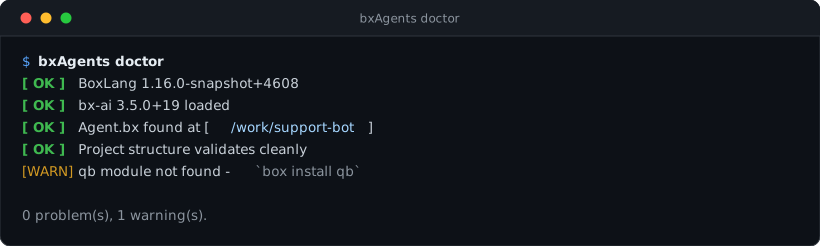
Diagnose the runtime and your project - read-only, never builds or writes anything.
bxAgents doctor [--json]
- Reports the running BoxLang version, and warns if it is older than this module's own declared minimum.
- Confirms
bx-aiis loaded (always required). - Runs the exact same discovery/resolve/validate phases
buildruns, without generating anything - every validation error/warningbuildwould hit shows up here first. - Checks every
*EnvVar-suffixed config value acrossgateways/*(bot tokens, webhook secrets, IMAP credentials, web UI account passwords, API keys) against the real environment right now, and warns about any that aren't set. Nothing else checks this -buildonly checks that an env var name was declared, never that it's actually populated, so a missing one otherwise fails silently at runtime (a gateway that never sends, a web UI account that can't sign in). - Checks the key variable of every provider the models use: the default model, each subagent, each profile (its
apiKeyEnv, else the provider's usual variable, such asOPENAI_API_KEY) and each capability default. A key that is not set in the environment is a warning that names who needs it. Doctor never reads the project's.env, so a key kept only there is reported as not set even though it works when the app is served.mockneeds no key, andbxAgents testruns every profile onmock. - Does not check for
qb,cbsecurity,cbauthorcbmailservices: they ship inside BxAgents and are copied into every built app. --jsonprints the raw findings as a JSON array ([{ status, message }, ...]) instead of the human-readable report - useful for scripting.- Exits
1if any check failed,0otherwise - warnings alone don't fail it.