Quick Start
The full lifecycle of a project: scaffold, edit, build, run.
On this page
Quick Start
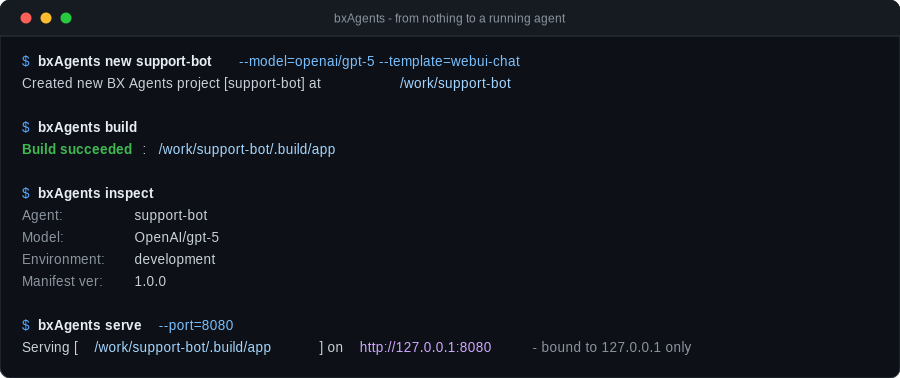
By the end you will have an agent you can chat with in the terminal and serve over HTTP. This walks through the full lifecycle of a BxAgents project: scaffold, edit, build, run.
Before you start you need BoxLang and the module installed (see Installation) and an API key for the model provider you pick (OPENAI_API_KEY for openai/gpt-5). To run bxAgents test you also need CommandBox (the box command) on your PATH: new runs box install once to fetch TestBox. Without box the project is still created, new prints a warning with the command to run later, and --skipInstall leaves the step out.
1. Scaffold a project
bxAgents new my-agent
At a terminal this asks what the agent should do (its model, tools, MCP servers (outside tool servers that speak the Model Context Protocol), channels, how people reach it, where it deploys) and writes the project to match; see the new wizard. It ends by printing the one-line command that builds the same project without questions. To skip the questions, pass a model:
bxAgents new my-agent --model=openai/gpt-5
--model is a provider/model slug (written to Agent.yml as separate provider: and model: lines) - see the model slug for how it's parsed. --name and --description are optional; --name defaults to the target directory's own name.
This creates:
my-agent/
├── Application.bx
├── Agent.yml
├── instructions.md
├── tools/
├── skills/
├── subagents/
├── gateways/
├── schedules/
├── mcp/
├── interceptors/
├── modules/
├── box.json
└── tests/
    └── specs/
        └── AgentSpec.bx
Plus a root Application.bx that extends the class every build generates (add your own settings and hooks there), a .env (secrets live here, so put your provider API keys in it and keep it out of source control), a .gitignore and a few dotfiles (.editorconfig, .gitattributes, .bxlint.json, .markdownlint.json, .boxlang.json). BoxLang loads the .env from the project root itself. The root box.json lists testbox as a development dependency.
This is the minimal starter - the default when --template is omitted. A template is a preset: the wizard (and flags such as --with, --channels and --deploy) add tools, channels and a deploy target on top of it. new can also scaffold one of 7 other built-in starters (--template=webui-chat|slack-bot|telegram-bot|github-bot|mcp-server|scheduled|multi-agent), each adding a bit of pre-wired content (a gateway, a scheduler) on top of the same skeleton, or skip scaffolding entirely and create the project from an existing GitHub repo (--repo=owner/repo) or a ForgeBox package (--forgebox=<slug>) instead - see the CLI Reference for the full list and how each one works. The agent is defined by an Agent.yml by default; pass --class to scaffold the advanced, class-based Agent.bx instead (see Agent.bx).
Agent.yml looks like this (--description adds a description: line):
# Your agent. Most agents need nothing more than this file and instructions.md.
# For code in the definition (hooks, dynamic instructions), scaffold with --class.
name: my-agent
provider: openai
model: gpt-5

environments:
  # `bxAgents test` builds against this override by default (see
  # BaseAgentSpec.bx) so a fresh project's tests need no API key or
  # network access - swap the model to test against a real provider.
  test:
    model: mock/mock-model
The agent is just this file plus instructions.md. See Agent.yml for every key.
Every convention folder (a folder whose name tells BxAgents what its files are, such as tools/ or gateways/) is created empty - add files to the ones your agent actually needs and delete (or just ignore) the rest.
2. Edit
Open instructions.md and write the agent's system prompt, and adjust name, description or model in Agent.yml as you like. Add a tool:
// tools/Greeter.bx
class {

	@AITool( "Say hello to someone by name." )
	function sayHello( name ) {
		return "Hello, " & arguments.name & "!";
	}

}
See the Conventions section for every other folder (skills/, subagents/, gateways/ (a gateway is a door into the agent: a chat platform, a web page or an HTTP path), schedules/, mcp/, interceptors/, modules/). You do not have to write them by hand: bxAgents add <kind> (tool, skill, subagent, gateway, schedule, interceptor, mcp, profile (a named model setup you can switch to in a chat), provider, capability, extension) asks a few questions and writes the files, and --dry-run shows them first.
3. Test it
box install        # once, to fetch testbox into lib/testbox (`new` already tried this for you)
bxAgents test
The scaffolded tests/specs/AgentSpec.bx passes out of the box - it builds your agent against the mock provider (no API key or network needed) and asserts on a scripted response. See tests/ for mockResponses() and the custom matchers (toHaveCalledTool, etc.) available to your own specs.
4. Build
bxAgents build
Runs the full build pipeline - config resolution, discovery, validation, code generation, manifest normalization - and writes a real ColdBox application to .build/ (the code in app/, the web root in public/), plus .build/manifest.json. Run bxAgents build --environment=production to build against an Agent.yml environment override (see Agent.yml).
If your project fails validation (duplicate tool names, an unknown model provider, a gateway entry with a bad path, ...) build fails with every collected error - not just the first one.
5. Run it
Two ways to talk to the built agent - both load the exact same GeneratedAgentFactory.bx and build the exact same agent tree, so they never diverge:
Interactively, from the terminal:
Put your provider key in .env first (the file has a commented OPENAI_API_KEY=sk-... line to uncomment and fill in). Without it the model call fails with the provider's "You didn't provide an API key" error.
bxAgents chat
At a terminal this is a full-screen chat that keeps your scrollback: answers stream in as formatted Markdown, tool calls show as they run, Esc stops the agent, and typing / lists the commands (/sessions, /resume, /name, /fork, /export, /notes, /context and more). Type @ to attach a file, or @picture.png to send a picture. Conversations are listed in the chat.db of the agent's data home (~/.bxagents/<agent name>/ by default; the messages last as long as the agent's memory does), so bxAgents chat --continue can pick up where you left off. See the terminal UI and Slash commands. To chat against the full app (schedulers, interceptors, gateways), use bxAgents chat --server, or --connect=<url> for a server that is already running (add --token=<token> if it wants one).
Over HTTP, via a real boxlang-miniserver process:
bxAgents serve --port=8080
Every served agent has an HTTP API at /__bxagents (open on your own machine, behind tokens when you share it), and the web page, the terminal chat and chat platforms all use it. See Call your agent from code. The root address, http://localhost:8080/, redirects to the web page when the project has one, and otherwise points at /__bxagents/health.
If your project also has a gateways/* entry with { exposes: "agent", path: "/api/chat" }, the agent is reachable at POST http://localhost:8080/api/chat/invoke (and /stream, /batch, /info - see gateways/). An exposes: "webui" entry adds the browser chat page.
See the web app
If you scaffolded with --template=webui-chat, bxAgents serve also serves the web app at /chat. This is the whole of it, in three minutes:

Each page has its own address under /chat (/chat/routines, /chat/settings, ...), and an address there that is no page answers 404. Every page is described in the web app guide.
6. Inspect, package, deploy
bxAgents doctor               # runtime, modules, project checks and unset environment variables
bxAgents inspect              # how the agent is composed: agents, tools, env vars, checks
bxAgents package --version=1.0.0   # writes dist/my-agent-1.0.0.bxa + .sha256 (a .bxa is the built agent as one portable file)
bxAgents deploy --destination=/path/to/somewhere   # copies the newest .bxa there
See The Manifest and Deployment & Secrets.
7. Clean up
bxAgents clean
Removes .build/ and dist/ only - your source conventions (Agent.yml, tools/, etc.) are never touched.
Next steps
- Build one agent end to end, with no account and no key, in the Introduction to BxAgents course.
- Walk through every convention folder in Conventions.
- Look at the working sample projects in
examples/. - See every verb's flags in CLI Reference.