CLI Reference
Every bxAgents verb and its flags.
On this page
CLI Reference
Usage: boxlang module:bxAgents <verb> [options]
(or the shorter bxAgents <verb> [options] form - see Installation.)
Global flags
These are handled before verb dispatch and never reach a verb.
| Flag | Effect |
|---|---|
-h, --help, help | Print usage (every verb + description) and exit 0. Accepted in any position, so bxAgents clean --help prints usage rather than running clean. Also printed (exit 1) if no verb is given at all. |
-v, --version | Print bxAgents v{version} and exit 0. Only meaningful as the very first token, so it never collides with package --version=1.0.0. |
Every verb accepts
--projectRoot=<path> (or a bare positional path as the first non-flag argument) to target a project other than the current directory. Precedence: --projectRoot flag > first positional argument > current working directory.
Argument syntax
Follows BoxLang's own documented CLI conventions:
| Form | Result |
|---|---|
--option | true |
--option=value / --option="quoted value" | value (surrounding quotes stripped) |
-o=value | short form with a value |
-o | short form, true |
-abc | combined shorthand: a, b, c all true |
--!option / --no-option | negation, false |
| anything else | a positional (the first becomes the project-root fallback) |
Repeated options: last one wins.
Note the first row: a bare --option is a boolean, not a way to pass the next token as its value. A flag that requires a value (--model, --message, --password, --environment, --port, ...) is therefore rejected with an error when written bare, rather than silently becoming true:
$ bxAgents new my-agent --model openai/gpt-5
Error: --model requires a value - write it as `--model=<value>`.
Always use the --flag=value form. The space-separated form is not supported.
Verbs
Scaffold a new agent project.
Run the full build pipeline.
Run your project's own tests/specs via TestBox.
Launch a real boxlang-miniserver process.
Interactive REPL against the built agent.
One non-interactive turn - for scripting/CI.
Package a built project into a .bxa.
Ship to a real deployment target.
Hash a plaintext password for a webui users entry.
Pretty-print an existing manifest.json.
Remove a project's .build/ and dist/ output.
Diagnose the runtime and project before build/serve surprise you.
new
Create a new agent project one of three mutually exclusive ways: scaffold from a built-in template, clone a GitHub repo, or install a ForgeBox package.
# Scaffold from a built-in template (default: minimal)
bxAgents new my-agent --model=openai/gpt-5 [--template=minimal|webui-chat|slack-bot|telegram-bot|github-bot|mcp-server|scheduled|multi-agent] [--name=...] [--description=...]

# Clone an existing GitHub repo
bxAgents new my-agent --repo=owner/repo-name

# Install a ForgeBox package
bxAgents new my-agent --forgebox=some-package-slug
--template,--repo, and--forgeboxname three different project SOURCES - exactly one applies. Combining any two of them is an error.--templatemode (the default when no source flag is passed at all -minimal):--modelis required - aprovider/modelslug (see Agent.bx).--namedefaults to the target directory's own basename.- Refuses to run if the target already contains an
Agent.bx. - Creates
Agent.bx,instructions.md, every convention folder (empty), a ready-to-runtests/folder (tests/box.json+tests/specs/AgentSpec.bx), a.envdeclaringBOXLANG_HOME=.build/runtime(matchingserve's own scoped runtime home - see known limitations for exactly what this does and doesn't cover), and a.gitignore(.build/,dist/,.env). Never overwrites an existing.env/.gitignore. --templatepicks one of 8 built-in starters, each layering a bit of pre-wired content on top of the base skeleton above (see Agent Templates for every generated file in full, plus how--repo/--forgeboxsources work and how to publish your own):minimal- the bare skeleton, nothing extra.webui-chat- adds agateways/webui.bxexposing the web chat UI at/chat.slack-bot- adds agateways/slack.bxchannel adapter, plus matchingSLACK_BOT_TOKEN/SLACK_APP_TOKENstub lines in.env.telegram-bot- adds agateways/telegram.bxchannel adapter, plus a matchingTELEGRAM_BOT_TOKENstub line in.env.github-bot- adds agateways/github.bxchannel adapter, plus matchingGITHUB_TOKEN/GITHUB_WEBHOOK_SECRET/GITHUB_BOT_NAMEstub lines in.env.mcp-server- adds an examplemcp/exampleServer.bxtool server and agateways/mcpExpose.bxentry exposing it as an MCP server at/mcp.scheduled- adds a realschedules/Scheduler.bxcalling the agent on a daily timer.multi-agent- adds aconfigure()to the rootAgent.bxdeclaring two subagents (researcher,writer), each scaffolded as its own realsubagents/<name>/Agent.bx+instructions.md.
- Also runs
box installinside the newtests/folder, sobxAgents testworks immediately with no separatecd tests && box installstep. This is best-effort: ifboxisn't onPATHor the install fails,newstill succeeds - the message just tells you to run it yourself. Pass--skipInstallto opt out of this step entirely.
--repomode (--repo=owner/repo-nameor a full URL): clones the repo via a bundled JGit dependency - nogitbinary needs to be installed. Always clones shallow (depth 1) and always strips the resulting.gitfolder afterward, so the new project starts with a clean history rather than staying tied to the template repo's own remote. Refuses to run into a directory that already exists and is non-empty, and fails clearly if noAgent.bxis found in the cloned repo.--forgeboxmode (--forgebox=<slug>): installs a ForgeBox package by talking to ForgeBox's own REST API directly (noboxCLI required). Fails clearly if the slug doesn't exist, the download fails, or the installed package has noAgent.bxat its root (unwrapping one level of nesting first, since many ForgeBox archives wrap their contents in a single top-level folder).--model,--repo, and--forgeboxare mutually exclusive with each other in the sense that only--templatemode needs--model---repo/--forgeboxnever require it, since the source project already defines its own.--name/--descriptionare ignored (with a warning in the output) when--repo/--forgeboxis used - the cloned/installed project defines its own.- The
tests/box installconvenience step (and--skipInstall) only ever apply to--templatemode - a cloned/installed project's owntests/folder (if it has one at all) is left untouched.
build
Run the full build pipeline.
bxAgents build [--environment=production] [--verbose] [--generatorVersion=1.0.0]
Writes .build/app/ and .build/manifest.json. Fails with every collected validation error if the project is invalid.
--verboseprints one line per build phase live as it runs - what got resolved/discovered/validated, per-phase counts (models, tools, gateways, warnings, etc.), which agents ended up registered inconfig/WireBox.bxand under which names, whether aschedules/Scheduler.bxwas found, and a finalBuild completed in Xmstiming line. Useful for debugging a slow or unexpectedly-behaving build. Silent otherwise ---verbosecosts nothing when not passed.--generatorVersionoverrides the string stamped intomanifest.json'sgenerator.version(see The Manifest) - defaults to"dev"when omitted. Exists for tooling that builds against a specific released version of this module and wants that recorded in the manifest, rather than the local dev default.
test
Run your project's own tests/specs via TestBox.
bxAgents test
- Requires
testboxinstalled undertests/testbox(cd tests && box install). - Builds your agent against the
mockprovider by default (Agent.bx'stest()environment override) - no API key or network access needed. - Prints pass/fail/error/skipped counts plus one line per failure, and exits non-zero if anything failed.
serve
Launch a real boxlang-miniserver process pointed at .build/app.
bxAgents serve [--port=8080] [--host=127.0.0.1]
- Requires a prior
build- fails clearly if.build/appdoesn't exist. - Fails clearly if
boxlang-miniserverisn't found onPATH. - Always serves the agent at
/__bxagents(POST /invoke,POST /stream,POST /batch,GET /info), whatever the project declares ingateways/- see the always-on agent route for how to require a token on it, or turn it off. - Binds to
127.0.0.1by default. A generated app is not authenticated unless you configured it to be (the web UI's API-key gate and sign-in are both opt-in), so the default keeps a development server off the network. Pass--host=0.0.0.0to bind all interfaces deliberately - the startup line tells you which of the two you got. --portmust be an integer in 1-65535; anything else fails immediately rather than inside the server process.- Writes
.build/miniserver.json(rewrites enabled,rewriteFileName: "index.bxm", health check on) before launching. - Scopes the server's own BoxLang runtime home to
.build/runtime(viaserverHome) rather than the shared~/.boxlangdefault, so each project's compiled-class cache and config overrides are isolated - andcleansweeps it for free, since it already wipes.buildwholesale.invoke --servergets this too, since it reusesserveinternally. This does not extend tochat/build/test/defaultinvoke- see known limitations.
chat
Interactive REPL against the built agent, using BoxLang's own MiniConsole for line reading.
bxAgents chat                                  # fast, in-process
bxAgents chat --server [--port=<port>]         # full app, own throwaway server
bxAgents chat --connect=http://127.0.0.1:8080  # full app, server you already run
Three modes, one REPL:
| Mode | What it talks to | Use it when |
|---|---|---|
| default | The generated agent factory, loaded directly in this process | You just want to talk to the agent. Fastest, no server. |
--server | A throwaway boxlang-miniserver it boots and tears down | You need real application semantics - models/, interceptors, the scheduler, gateways. |
--connect=<url> | A server that is already running | You have a serve open in another terminal, or want to talk to a deployment. |
- Requires a prior
build- except with--connect, which talks to a server someone else is running and so needs nothing built locally. - Default: loads
GeneratedAgentFactory.bxdirectly (no ColdBox/WireBox container involved) and callsbuildAgent()once per session - the exact same factoryserve's HTTP routes use, so the agent itself never diverges. What does differ is everything ColdBox brings: nomodels/, no scheduler, no interceptors, no gateway registry. When that matters, use--server. --server: boots a real miniserver on an ephemeral loopback port and drives the REPL over HTTP against the project's always-on/__bxagentsroute, shutting it down on exit.--portpins the port instead of taking a free one.--connect: drives the same REPL against a running server, starting and stopping nothing. The URL is the server root (http://host:port), not the agent path -chatappends that itself.--serverand--connectare mutually exclusive: one says "start a server for me", the other "don't". Passing both fails immediately rather than silently honoring one.- Both HTTP modes stream the reply: the answer appears token by token as the agent produces it, over the route's
/stream(SSE) sub-route, rather than arriving all at once when the turn ends. If the stream cannot be opened — an older server without a/streamsub-route, or a proxy that won't passtext/event-stream— it falls back to/invokeand you get the whole reply at the end instead of an error. - Both HTTP modes carry the server's
threadIdacross turns, so a session is one conversation rather than a series of unrelated first messages. - A turn that pauses for a human-in-the-loop decision says so instead of appearing to answer with silence, and points at the
/gateways/interactions/endpoint where the decision is submitted. - If the route is gated behind
agentApi.tokenEnvVar, these modes get a clear401error rather than a confusing timeout - they send no token. - Type
exitorquitto leave. - Needs a real interactive TTY (
MiniConsoleshells out tosttyfor raw mode) - it will not work piped/non-interactively. Useinvokefor scripting.
invoke
A single, non-interactive turn against the built agent: submit one message, print the response, exit. Exists for scripting/CI, where chat's TTY requirement is a hard blocker.
bxAgents invoke --message="What's the weather in Boston?" [--json]
bxAgents invoke --message="..." --server [--port=<port>]
- Requires a prior
build. - Default (no
--server): loadsGeneratedAgentFactory.bxdirectly (no ColdBox container, no HTTP) and calls the agent once - the same in-process pathchatuses internally, just without the REPL loop. Noserve/gateway prerequisite at all. --server: launches a real, throwawayboxlang-miniserverprocess (same asserve), sends the message as a real HTTP request to the project's always-on/__bxagentsroute, then shuts the server back down. Exercises the actual served path (ColdBox routing, interceptors, gateways) rather than the in-process shortcut. Needs nogateways/*entry of any kind - the reserved route is emitted on every build, so a freshly scaffolded project that exposes nothing publicly still works.--portdefaults to a free ephemeral port so it never collides with an already-runningserve.--jsonprints{"response": "..."}instead of the plain-text response.
package
Package a built project into a .bxa.
bxAgents package [--version=1.0.0]
- Requires a prior
build- reads.build/manifest.json; fails clearly if it's missing. --versiondefaults to1.0.0.- Writes
dist/{agentName}-{version}.bxa, a sibling.sha256, and a redactedmanifest.jsoncopy. See Deployment & Secrets.
deploy
Ship a built/packaged project to a real deployment target via the pluggable deploy/ convention.
bxAgents deploy --name=production
# or, the flag-only shorthand (local only):
bxAgents deploy --destination=/path/to/somewhere [--target=local]
--name=<entry>dispatches to whatever target the nameddeploy/<entry>.bx/.jsonentry declares (local,ssh,ftp,sftp,docker, ordigitalocean).- The flag-only form (
--target=local --destination=..., or no--targetat all) works with nodeploy/folder present - onlylocalsupports it; every other target requires a named entry, since it needs more configuration than a couple of flags can carry. local/ssh/ftp/sftprequire a priorpackage;docker/digitaloceanrequire a priorbuild(they build straight from.build/app).ftp/sftpneed thebx-ftpmodule installed alongside BxAgents (see Installation).
hash-password
Turn a plaintext password into the passwordHash value a webui entry's users block accepts.
bxAgents hash-password --password="<your-password>"
--passwordis required.- Prints the hash to stdout -
pbkdf2$<iterations>$<salt>$<derivedKey>, PBKDF2-HMAC-SHA256, salted per call. Safe to commit: it's one-way, and hashing the same password twice yields two different (both valid) hashes. - Kept deliberately identical to the hasher the generated web UI itself uses to verify a sign-in - a hash produced here always verifies there.
inspect
Pretty-print an existing .build/manifest.json without rebuilding.
bxAgents inspect [--json]
- Requires a prior
build. - Prints agent name, model, environment, manifest version, generator name/version, and file count.
--jsonprints the raw manifest as JSON instead of the human-readable summary - useful for scripting.
clean
Remove a project's .build/ and dist/ output.
bxAgents clean [--force]
- Only ever removes
.buildanddist- source conventions (Agent.bx,tools/, etc.) are never touched. - Refuses to run unless the directory looks like a BxAgents project (an
Agent.bxor a.build/manifest.json).dist/is a common build-output name across the wider ecosystem, so this stops acleanin the wrong directory from deleting something unrelated.--forceskips the check when you genuinely mean it. - Prints the absolute path of each directory before removing it.
- Reports "Nothing to clean" if neither directory exists.
doctor
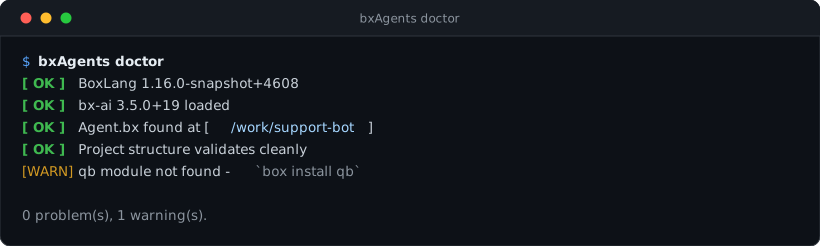
Diagnose the runtime and your project - read-only, never builds or writes anything.
bxAgents doctor [--json]
- Reports the running BoxLang version, and warns if it is older than this module's own declared minimum.
- Confirms
bx-aiis loaded (always required). - Runs the exact same discovery/resolve/validate phases
buildruns, without generating anything - every validation error/warningbuildwould hit shows up here first. - Checks every
*EnvVar-suffixed config value acrossgateways/*(bot tokens, webhook secrets, IMAP credentials, web UI account passwords, API keys) against the real environment right now, and warns about any that aren't set. Nothing else checks this -buildonly checks that an env var name was declared, never that it's actually populated, so a missing one otherwise fails silently at runtime (a gateway that never sends, a web UI account that can't sign in). - Warns if a webui-exposed project doesn't have
qbloaded, or if one declaringusersdoesn't havecbauthloaded - both arebox.jsondependencies you install yourself, never bundled by this module. --jsonprints the raw findings as a JSON array ([{ status, message }, ...]) instead of the human-readable report - useful for scripting.- Exits
1if any check failed,0otherwise - warnings alone don't fail it.