BxAgents
Build AI agents by convention — a conventions-based framework for AI agents powered by BoxLang AI.

BxAgents is a conventions-based AI agent framework for BoxLang,
built on ColdBox and
BX AI. You describe an agent
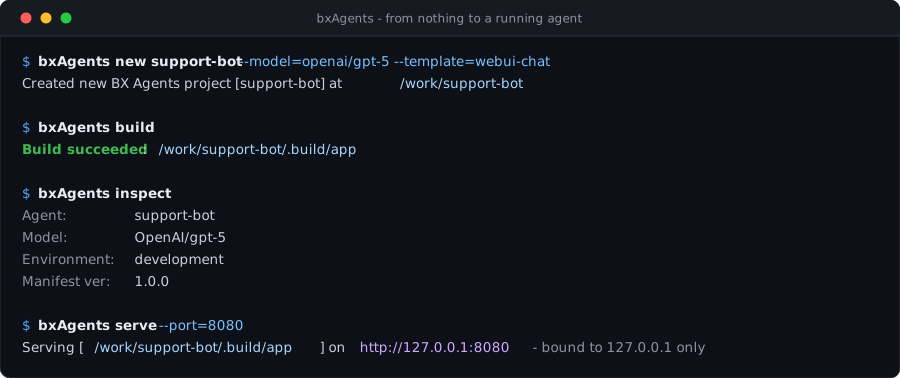
with files and folders - not a framework's API surface - and bxAgents build assembles a
real, runnable ColdBox application out of it.
Discovery, validation and code generation run once, not on every boot. What you run afterwards is a plain ColdBox app.
Agent.bx and instructions.md are the only required files. Every other convention folder
is optional and only shapes the output if it exists.
Drop an @AITool-annotated function into tools/, or a SKILL.md folder into skills/ -
both are discovered and wired for you.
subagents/ nests the exact same convention tree, so a team of specialists is just more
folders - built leaf-first.
Telegram, Slack, Discord, Email, WhatsApp, Teams, Twilio, GitHub and Signal, plus http,
cli and mock.
Ask for it in Agent.bx and the build produces a themeable, streaming chat front end with
session history.
Build one in four steps
install-bx-module bx-ai bx-agents
box install bx-ai,bx-agents
bxAgents new my-agent --model=openai/gpt-5
Then edit instructions.md and add whichever convention folders you need.
bxAgents build
Discovery, validation, manifest, code generation - into .build/app/.
bxAgents chat
# or serve it over HTTP:
bxAgents serve --port=8080
Start from something, not nothing
new doesn't only scaffold a blank agent - pick one of 8 built-in templates, clone an
existing GitHub repo, or install a ForgeBox package instead.
--template=webui-chat|slack-bot|telegram-bot|github-bot|mcp-server|scheduled|multi-agent -
real, working content layered on the same base skeleton.
--repo=owner/repo - a bundled JGit client clones it; no git binary required.
--forgebox=<slug> - talks to ForgeBox's REST API directly; no box CLI required.
See Agent Templates for every generated file in detail, and how to publish your own.
A chat UI you didn't have to build
Set exposes: "webui" on a gateway and the build emits a complete front end - conversation
history, streaming replies, light/dark theming and a mobile layout - wired to your agent.


It is generated CSS and generated markup - themeable from Agent.bx,
with no front-end build step of your own.
What build actually produces
Your convention tree, and the plain ColdBox application build turns it into.
your-agent/
├── Agent.bx           # name, model, description
├── instructions.md    # the system prompt
├── tools/             # @AITool functions
├── skills/            # SKILL.md capabilities
├── subagents/         # nested agent trees
├── models/            # named model configs
├── gateways/          # HTTP/MCP/chat exposure
├── schedules/         # a real ColdBox scheduler
├── mcp/               # MCP servers you host
├── interceptors/      # lifecycle hooks
└── modules/           # module dependencies
.build/app/
├── Application.bx
├── config/
│   ├── ColdBox.bx
│   ├── WireBox.bx
│   ├── Router.bx
│   └── Scheduler.bx
├── agent/
│   └── GeneratedAgentFactory.bx
├── tools/  skills/  mcp/
├── handlers/  interceptors/
└── index.bxm
Only Agent.bx is required. instructions.md is optional - set instructions directly
in the class, or drop the file in and let the build wire it in. Every other folder only
affects the generated output if it exists and has content in it - so you add
conventions as you actually need them.
Agent.bx extends BX AI's own AiAgent directly - the build instantiates your class
rather than rebuilding one from a config struct, so what you write is what runs, and an
IDE can introspect it like any other class. See Agent.bx.
Reach it from anywhere
Nine push-style gateways - Telegram, Slack, Discord, Email, WhatsApp Cloud, Teams, Twilio,
GitHub and Signal - coordinated by one session with queue / steer / interrupt policies.
Expose the agent over HTTP routes, or host local MCP servers from mcp/ so other clients
can call your tools.
Package a portable .bxa and deploy it with local, ssh, docker, digitalocean,
ftp or sftp - secrets stay environment variables, never build artifacts.
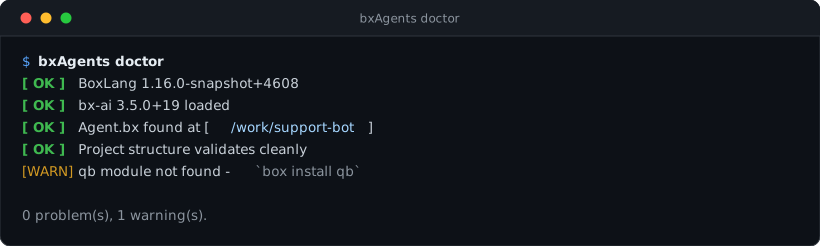
Check your setup at any time
Where to go next
Install BoxLang, BX AI and BxAgents.
Scaffold, build and chat with your first agent.
One page per convention folder, start to finish.
Exactly what build does, in order.
Every verb and its flags.
Every built-in starter, GitHub/ForgeBox sourcing, and publishing your own.
Package a .bxa and ship it, safely.
Every convention folder also has a working, buildable sample under
examples/.
BxAgents is under active development. Known Limitations tracks
the honest gaps - what's tested against a real running app, what still only runs against
BX AI's "mock" provider, and one real upstream ColdBox quirk this project ran into and
worked around.