Quick Start
The full lifecycle of a project: scaffold, edit, build, run.
On this page
Quick Start
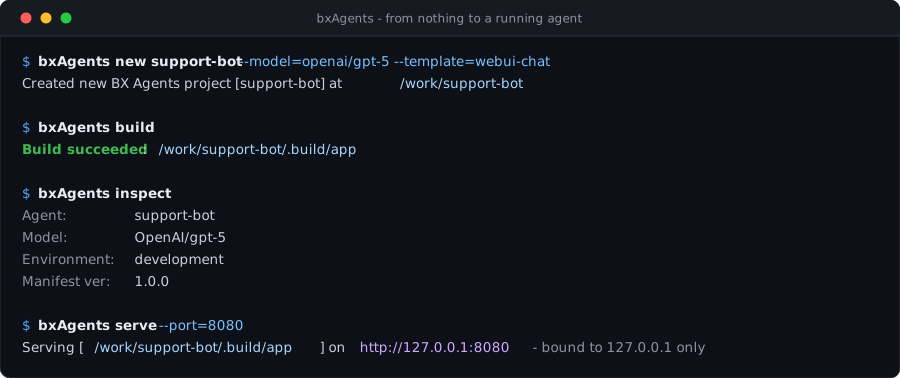
This walks through the full lifecycle of a BxAgents project: scaffold, edit, build, run.
1. Scaffold a project
bxAgents new my-agent
At a terminal this asks what the agent should do (its model, tools, MCP servers, channels, how people reach it, where it deploys) and writes the project to match; see the new wizard. To skip the questions, pass a model:
bxAgents new my-agent --model=openai/gpt-5
--model is a provider/model slug - see the model slug for how it's parsed. --name and --description are optional; --name defaults to the target directory's own name.
This creates:
my-agent/
├── Agent.yaml
├── instructions.md
├── tools/
├── skills/
├── subagents/
├── gateways/
├── schedules/
├── mcp/
├── interceptors/
├── modules/
└── tests/
    ├── box.json
    └── specs/
        └── AgentSpec.bx
Plus a .env (with BOXLANG_HOME=.build/runtime; put your provider API keys there too) and a .gitignore. BoxLang loads the .env from the project root itself.
This is the minimal starter - the default when --template is omitted. new can also scaffold one of 7 other built-in starters (--template=webui-chat|slack-bot|telegram-bot|github-bot|mcp-server|scheduled|multi-agent), each adding a bit of pre-wired content (a gateway, a scheduler) on top of the same skeleton, or skip scaffolding entirely and create the project from an existing GitHub repo (--repo=owner/repo) or a ForgeBox package (--forgebox=<slug>) instead - see the CLI Reference for the full list and how each one works. The agent is defined by an Agent.yaml by default; pass --class to scaffold the advanced, class-based Agent.bx instead (see Agent.bx).
Agent.yaml looks like this (--description adds a description: line):
# Your agent. Most agents need nothing more than this file and instructions.md.
# For code in the definition (hooks, dynamic instructions), scaffold with --class.
name: my-agent
model: openai/gpt-5

environments:
  # `bxAgents test` builds against this override by default (see
  # BaseAgentSpec.bx) so a fresh project's tests need no API key or
  # network access - swap the model to test against a real provider.
  test:
    model: mock/mock-model
The agent is just this file plus instructions.md. See Agent.yaml for every key.
Every convention folder is created empty - add files to the ones your agent actually needs and delete (or just ignore) the rest.
2. Edit
Open instructions.md and write the agent's system prompt, and adjust name, description or model in Agent.yaml as you like. Add a tool:
// tools/Greeter.bx
class {

	@AITool( "Say hello to someone by name." )
	function sayHello( name ) {
		return "Hello, " & arguments.name & "!";
	}

}
See the Conventions section for every other folder (skills/, subagents/, gateways/, schedules/, mcp/, interceptors/, modules/).
3. Test it
box install        # once, to fetch testbox into lib/testbox (`new` already tried this for you)
bxAgents test
The scaffolded tests/specs/AgentSpec.bx passes out of the box - it builds your agent against the mock provider (no API key or network needed) and asserts on a scripted response. See tests/ for mockResponses() and the custom matchers (toHaveCalledTool, etc.) available to your own specs.
4. Build
bxAgents build
Runs the full build pipeline - config resolution, discovery, validation, code generation, manifest normalization - and writes a real ColdBox application to .build/app/, plus .build/manifest.json. Run bxAgents build --environment=production to build against an Agent.yaml environment override (see Agent.yaml).
If your project fails validation (duplicate tool names, an unknown model provider, a gateway entry with a bad path, ...) build fails with every collected error - not just the first one.
5. Run it
Two ways to talk to the built agent - both load the exact same GeneratedAgentFactory.bx and build the exact same agent tree, so they never diverge:
Interactively, from the terminal:
bxAgents chat
Over HTTP, via a real boxlang-miniserver process:
bxAgents serve --port=8080
If your project has a gateways/* entry with { exposes: "agent", path: "/api/chat" }, the agent is now reachable at POST http://localhost:8080/api/chat/invoke (and /stream, /batch, /info - see gateways/).
The very first request to a freshly booted app's toAi() route can transiently fail. Send a warm-up request before relying on it under load.
6. Inspect, package, deploy
bxAgents inspect              # how the agent is composed: agents, tools, env vars, checks
bxAgents package --version=1.0.0   # writes dist/my-agent-1.0.0.bxa + .sha256
bxAgents deploy --destination=/path/to/somewhere   # copies the newest .bxa there
See The Manifest and Deployment & Secrets.
7. Clean up
bxAgents clean
Removes .build/ and dist/ only - your source conventions (Agent.yaml, tools/, etc.) are never touched.
Next steps
- Walk through every convention folder in Conventions.
- Look at the working sample projects in
examples/. - See every verb's flags in CLI Reference.